
Registration reports
Download ready-made lists: the register, applications, PIN renewals and certificates.
What you will learn
- Open the Registration reports
- Filter a report
- Download it as Excel or PDF, and know how downloads are protected
demo.ahpcghana.com/staff/reports?only=register,applications,renewals,certificates&for=Registration
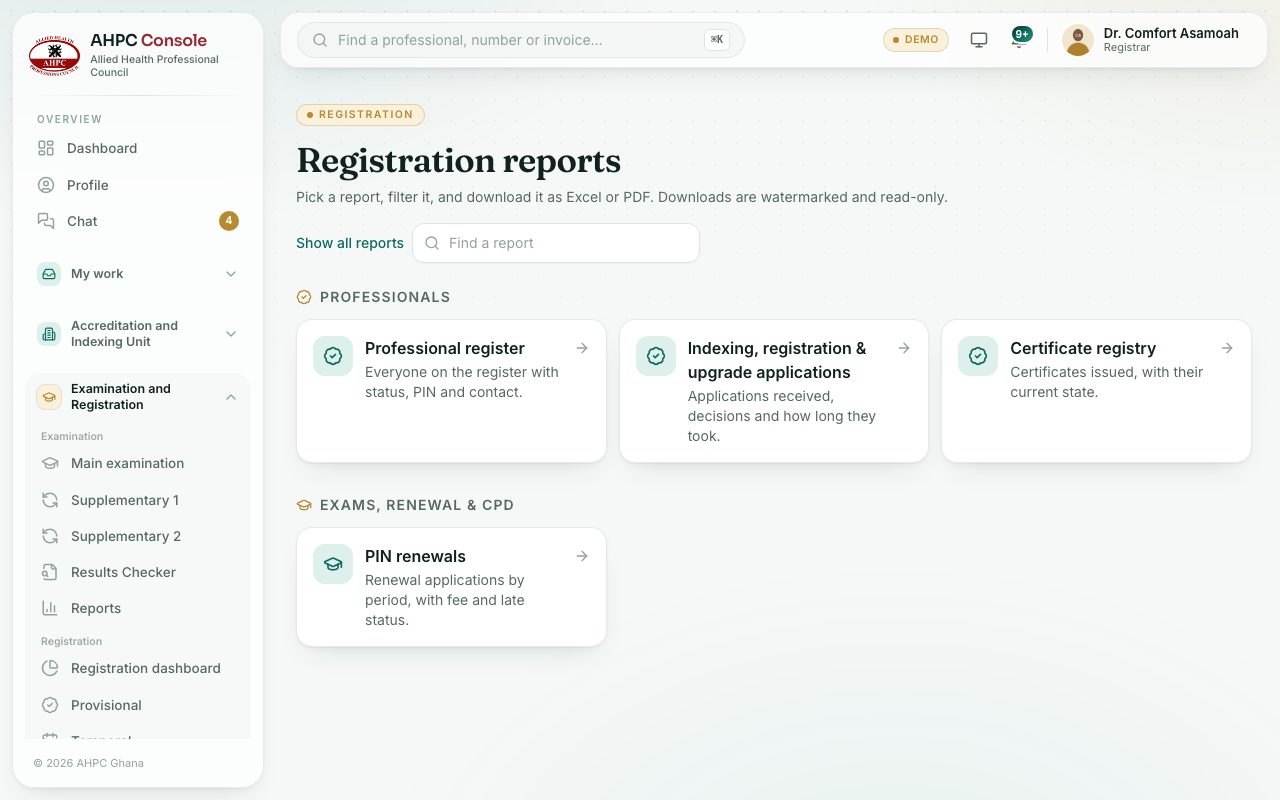
Step by step
- In the left menu, under Registration, choose Reports.
- Pick a report: Professional register, Indexing, registration & upgrade applications, PIN renewals or Certificate registry.
- Set the filters, for example status, profession, region or dates.
- Press PDF or Excel.
What you will see
- The applications report shows how many days each decision took.
- Downloads come as PDF or Excel only. Every download is marked with the Council’s name, your name and the date and time, across the whole page. PDF files carry this watermark on every page. Excel files open read-only: you can read, scroll and filter, but not change them.
Check yourself
Pick an answer for each question, then press Check my answers. Nothing is saved or sent.