
How an accreditation moves, step by step
Follow an application from the partner’s uploads to the decision: zonal check, invoice, reviewers, visit and decision.
What you will learn
- Name the five steps of an accreditation
- Know who does each step
- Read the step bar on an application
Every programme or facility application goes through the same five steps. The step bar at the top of each application shows which step it is at, with a tick for each step done.
demo.ahpcghana.com/staff/accreditation/programmes
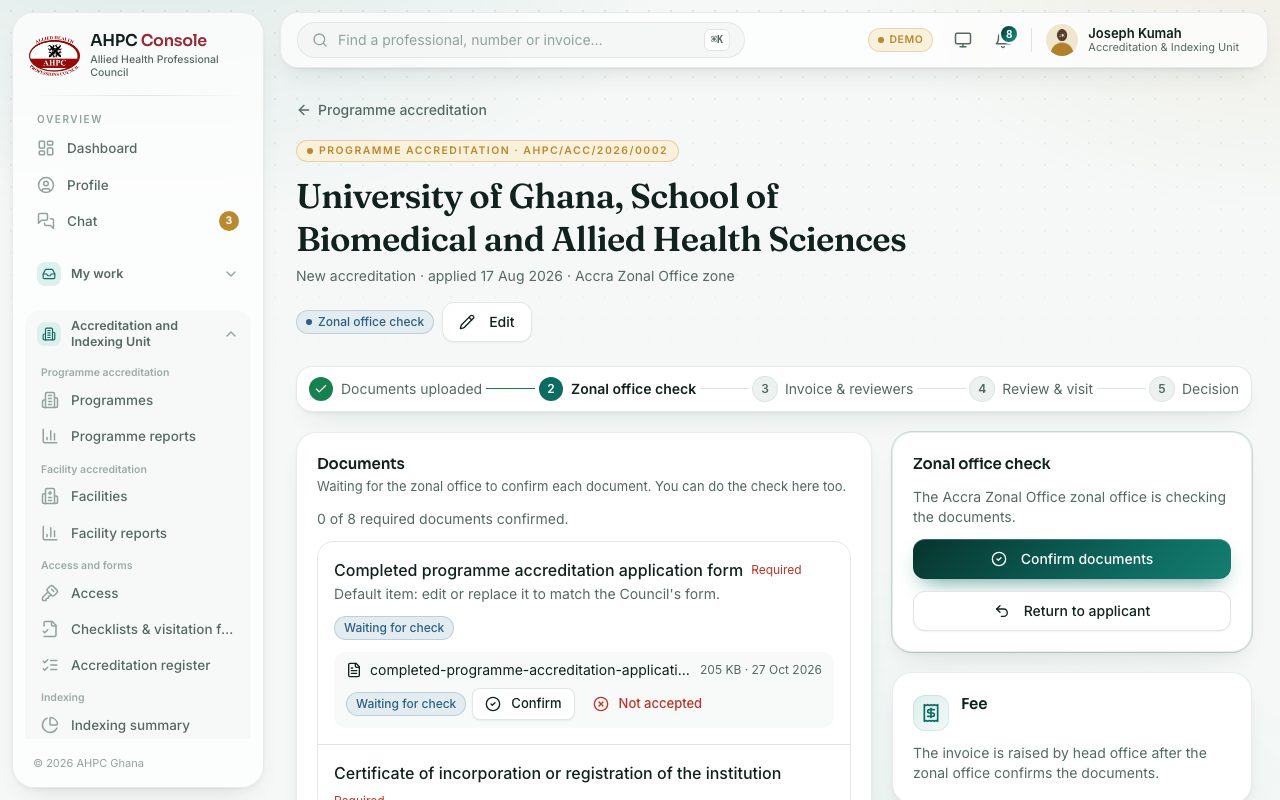
Step by step
- 1. Documents uploaded. The institution’s nominee (or the facility’s representative) signs in to the partner area, starts the application, uploads each document on the checklist and submits it.
- If they gave the documents to the Council on paper, the unit can upload them and press Submit for them.
- 2. Zonal office check. The zonal officer for the applicant’s zone opens each document and confirms it or marks it Not accepted, then sends the application to head office or returns it to the applicant.
- 3. Invoice & reviewers. Head office raises the accreditation fee invoice (or waives the fee) and chooses the reviewers who visit.
- 4. Review & visit. Each reviewer visits, scores every line of the visitation form, gives a recommendation and sends a report.
- 5. Decision. Head office reads the reports and records the decision: approve, approve with conditions, defer or reject.
What you will see
- A returned application goes back to step 1. The applicant fixes what you asked for and submits again; it then comes back to the zonal office as resubmitted.
- The History box on the right lists every step, who did it and when.
- The applicant follows the same step bar in their partner area and is told by email at each step.
Check yourself
Pick an answer for each question, then press Check my answers. Nothing is saved or sent.