
A professional’s record and status
Open one professional’s full record, and suspend, reinstate or strike them off the register.
What you will learn
- Open a professional’s record
- Find their applications, exams, renewals, invoices and credentials
- Suspend, reinstate or strike off
demo.ahpcghana.com/staff/professionals
Step by step
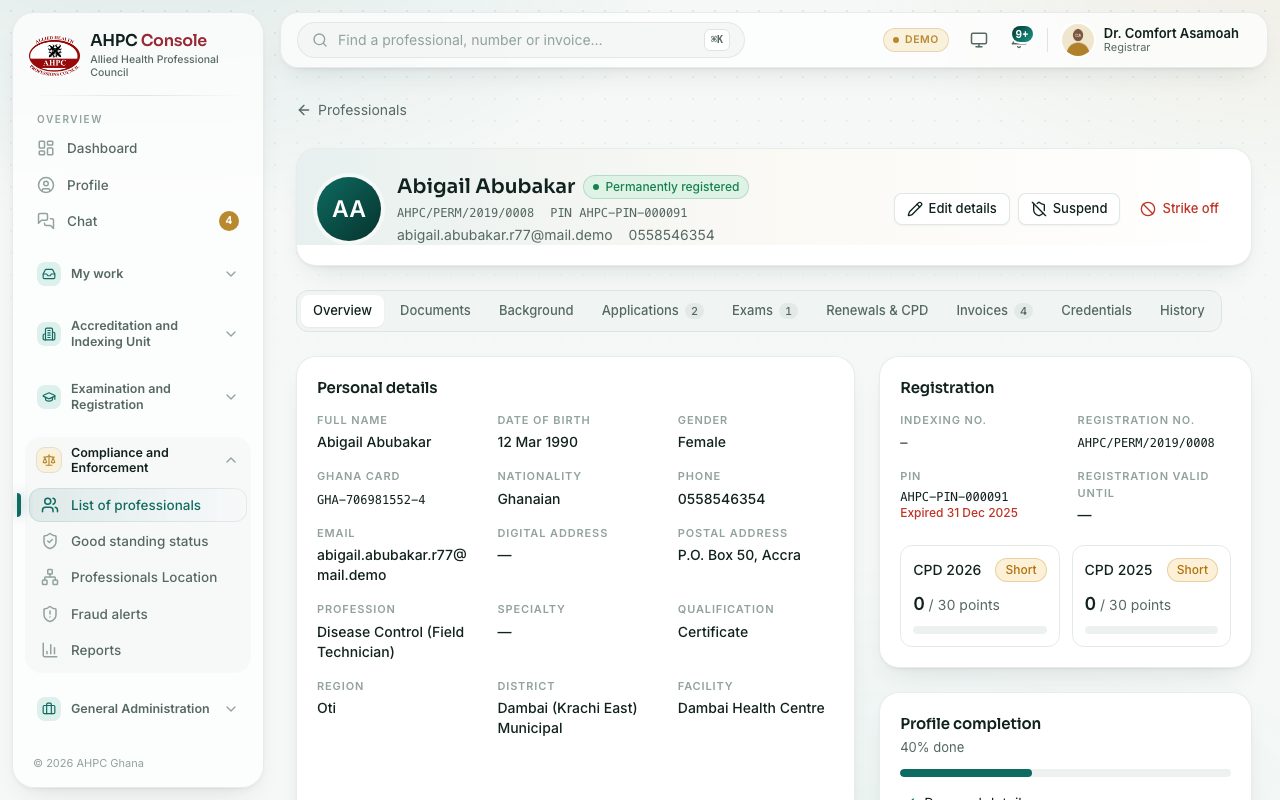
- In the left menu, open Compliance and Enforcement and choose List of professionals. Click a person.
- Use the tabs: Overview, Documents, Background, Applications, Exams, Renewals & CPD, Invoices, Credentials and History.
- To change their status, use the buttons at the top:
- Suspend: type the Reason. They show as not in good standing on public checks until reinstated.
- Strike off: type the Reason. They are removed from the register.
- Reinstate: for a suspended or struck-off professional. They return to their registered status.
- Press the confirm button in the dialog.
What you will see
- The reason for a suspension or strike-off shows in red under the name.
- The History tab records every status change.
- The Credentials tab lists certificates (with PDF) and ID cards.
Check yourself
Pick an answer for each question, then press Check my answers. Nothing is saved or sent.