
The Stores overview
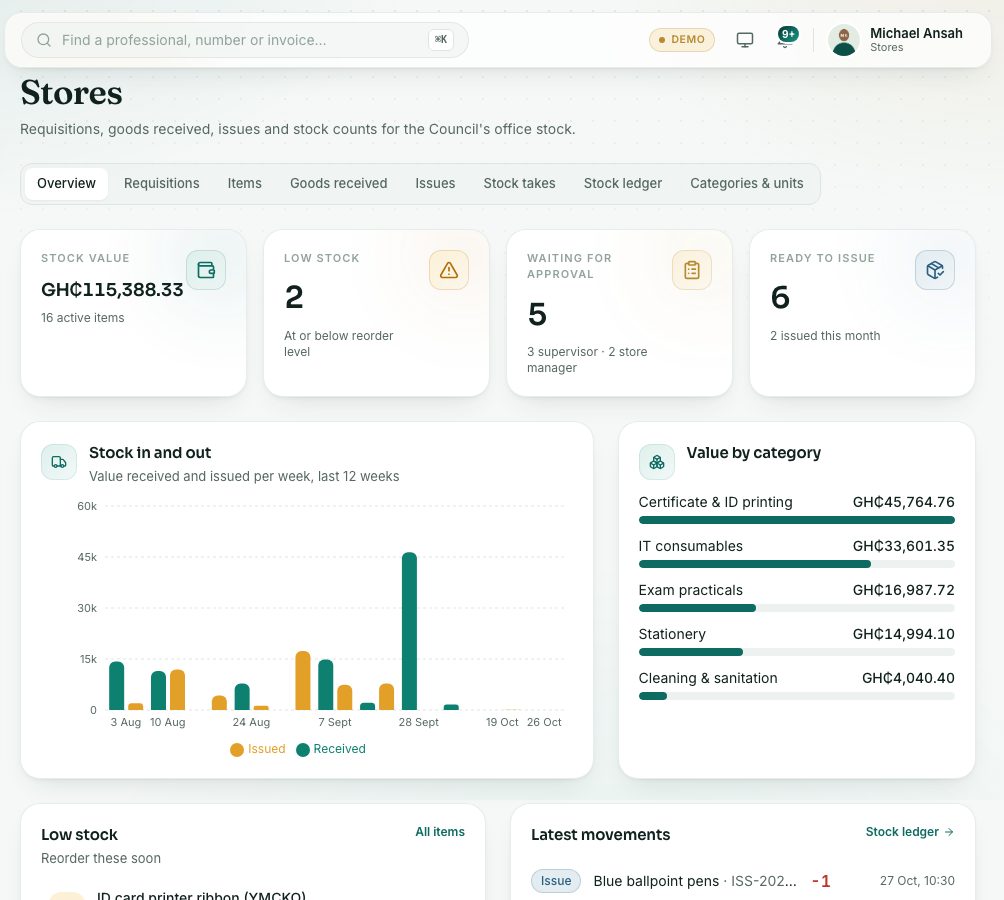
The Stores overview shows the value of stock, what is running low, requisitions waiting for approval or issue, and the latest stock movements.
What you will learn
- Open the Stores overview
- Read the four headline figures
- Move between the Stores tabs
- Find the stores reports
Every Stores page has the same row of tabs under the title: Overview, Requisitions, Items, Goods received, Issues, Stock takes, Stock ledger and Categories & units. You only see the tabs your role can use.
Step by step
- In the left menu, open System administration and choose Stores overview. Or open any Stores page and press the Overview tab.
- Read the four figures. Each one opens the matching list when you click it:
- Stock value: the value of everything in stock, in GH₵, and how many active items there are.
- Low stock: items at or below their reorder level.
- Waiting for approval: requisitions waiting for a supervisor or the store manager.
- Ready to issue: approved requisitions waiting for the store to hand items out.
- Stock in and out shows the value received and issued each week for the last 12 weeks. Value by category shows where the money sits.
- Low stock lists items to reorder soon. Latest movements shows the last receipts, issues and adjustments. Press Stock ledger for the full history.
The stock ledger
The Stock ledger tab lists every movement: opening balances, receipts, issues, stock-take adjustments and reversals. Filter by item, by type of movement and by date. Each row shows the quantity in or out, the balance after it, the unit cost and who did it.
Stores reports
Stores reports are under System administration → All reports, in the Stores group: Stock balance & valuation, Stock movement ledger, Requisition register, Issue register, Goods received register and Stock-take variances. Each one downloads as CSV, PDF or Excel.
Check yourself
Pick an answer for each question, then press Check my answers. Nothing is saved or sent.