
Sign in to the partner area
Sign in with the email and one-time password the Council sent you, change your password, and see what access you have.
What you will learn
- Sign in for the first time
- Change the one-time password
- Read your Home page and menu
- Know the sign-in rules
The partner area is for people outside the Council who help with accreditation and indexing: an institution’s programme nominee, a health facility’s representative, an institution’s indexing coordinator, and accreditation reviewers. The Council gives you access and you get an email (and sometimes an SMS) with how to sign in.
demo.ahpcghana.com/partner
Step by step
- Open portal.ahpcghana.com and press Sign in.
- Type the email address the Council used and the one-time password from the email. Press Sign in.
- Change the password straight away: press your name at the top right, then Change password. Type the Current password (the one-time password) and a New password of at least 10 characters, mixing letters with numbers or symbols. Press Change password.
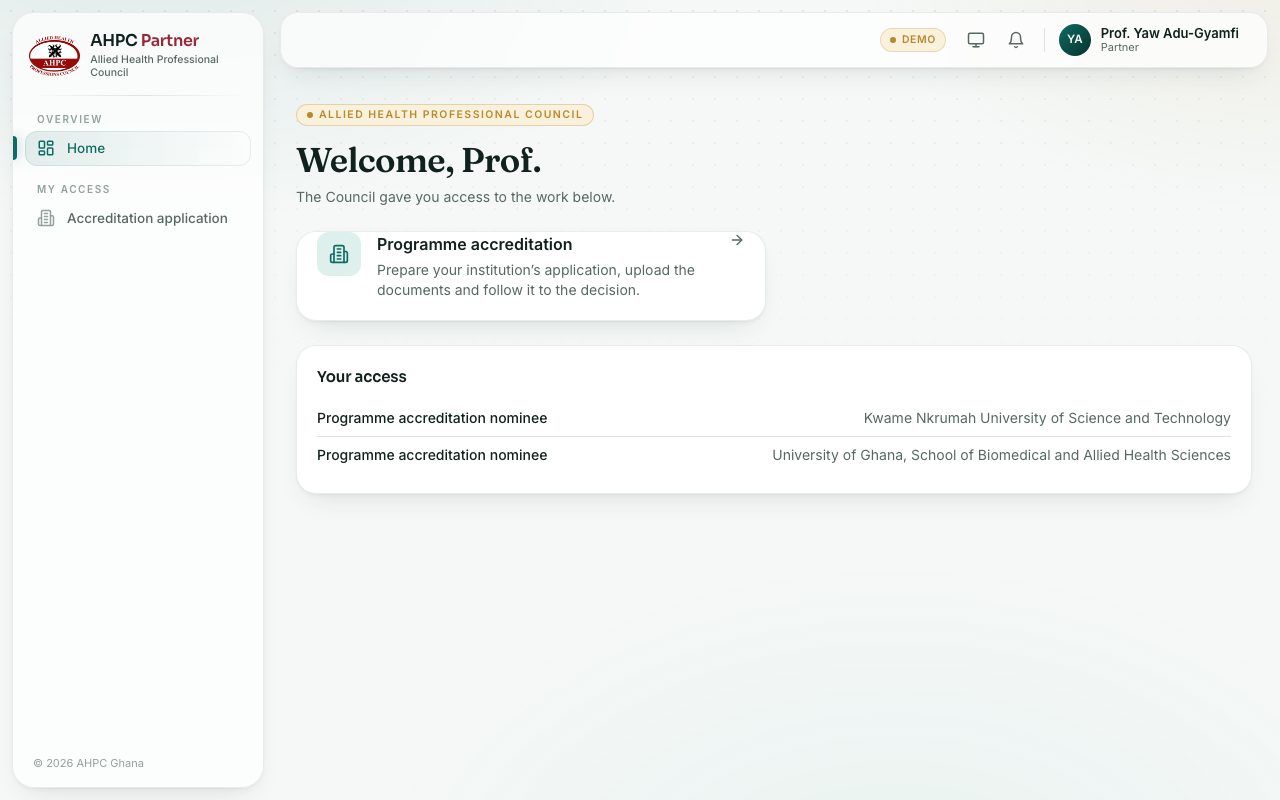
- Read the Home page. It has one box for each kind of work you can do. Press a box to open it.
- Your access at the bottom lists each access the Council gave you, and for which institution or facility.
- The left menu shows only what you have access to, under My access:
- Accreditation application for nominees and facility representatives.
- Students for indexing for indexing coordinators.
- My reviews for reviewers.
What you will see
- If the Home page says No access yet, your access may have been taken away or not set up yet. Contact the Council.
- If you already had a portal account with the same email, the access is added to it and your password stays the same.
Check yourself
Pick an answer for each question, then press Check my answers. Nothing is saved or sent.