
Create your account
Make your own account on the portal. It takes about a minute, and you need it for everything else in this course.
What you will learn
- Open the Create your account page
- Fill in your name, email, mobile number and password
- Know where the portal takes you next
One account follows you all the way: from student indexing, through registration and the licensure exam, to your yearly PIN renewal. Use an email address and a mobile number that you will keep. The Council sends updates and password reset codes to them.
demo.ahpcghana.com/register
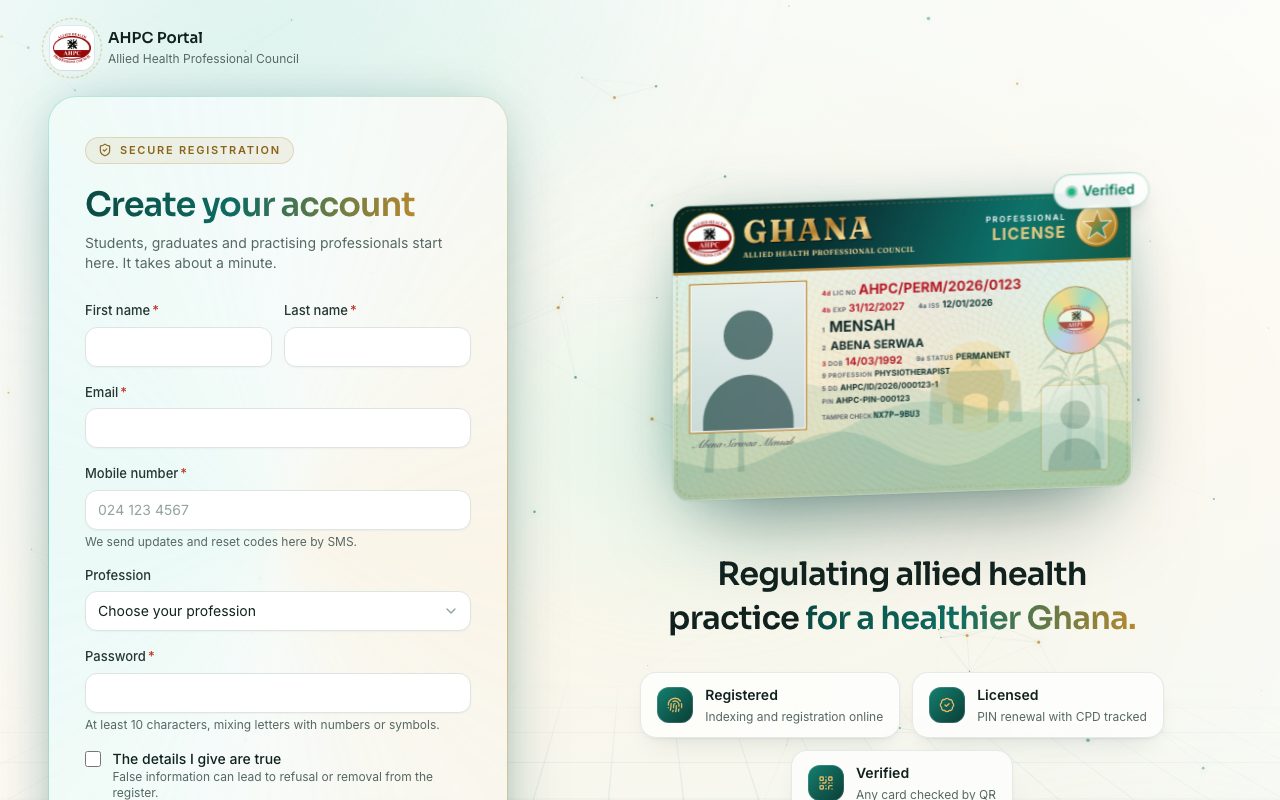
Step by step
- Go to portal.ahpcghana.com/register, or open the sign-in page and press Create an account.
- Type your First name and Last name exactly as they appear on your Ghana Card.
- Type your Email and your Mobile number, for example 024 123 4567.
- Choose your Profession from the list. You can also set it later in My profile.
- Choose a Password:
- At least 10 characters.
- Mix letters with numbers or symbols.
- Tick The details I give are true.
- Press Create account.
What you will see
- You are signed in straight away and the portal opens My profile, so you can start filling in your details.
- The Create account button stays grey until you tick The details I give are true.
- If the email already has an account, the form says so. Sign in instead, or reset your password.
Check yourself
Pick an answer for each question, then press Check my answers. Nothing is saved or sent.