
Review an application and its documents
Open an application, check the applicant’s details, open each document and mark it verified or rejected.
What you will learn
- Read the Application, Documents and Decision panels
- Start the review so others know you have it
- Verify or reject each document
- Spot what stops an approval
demo.ahpcghana.com/staff/registrations?registration_type=provisional
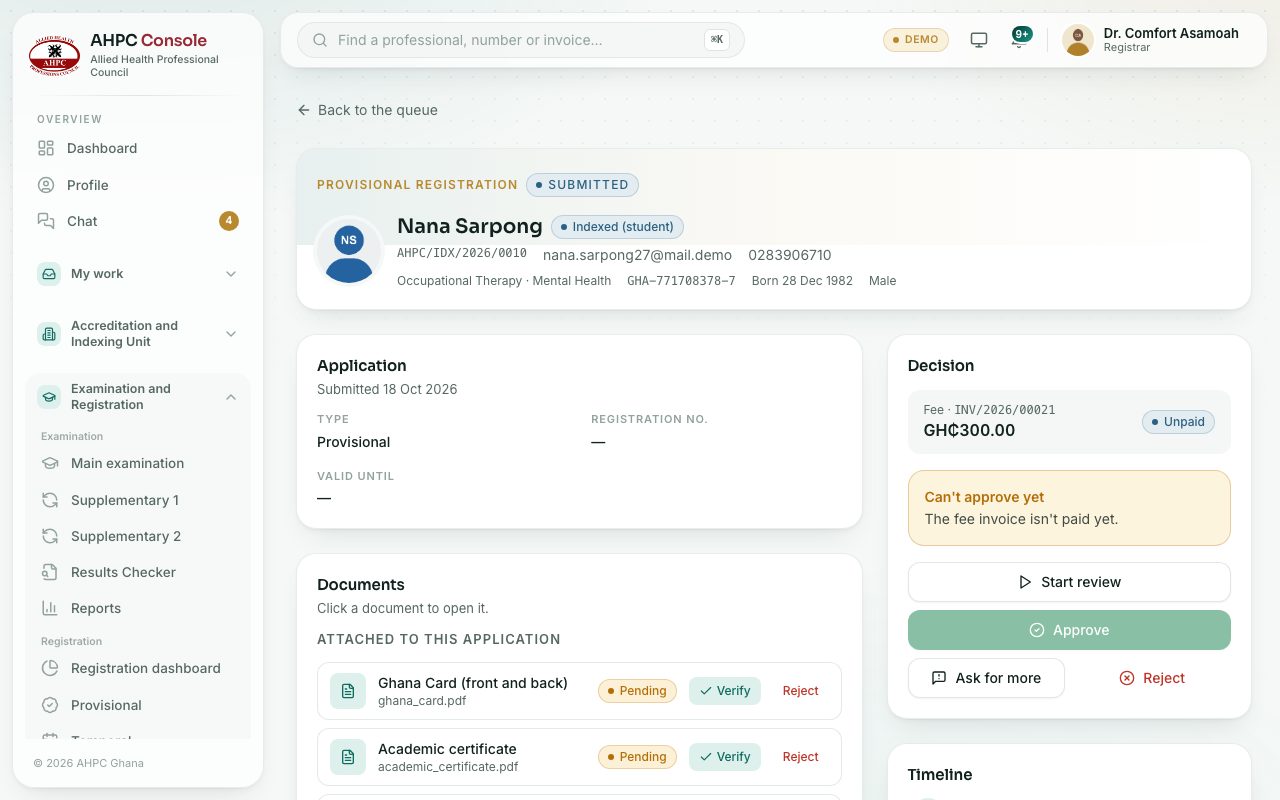
Step by step
- Open the application from its queue.
- At the top you see the applicant’s name, photo, profession, Ghana Card number, date of birth and gender.
- Read the Application panel:
- The type and the registration number (empty until approval).
- For Temporal: the Reason and Facility.
- For Permanent: Licensure exam shows Passed or Not passed yet.
- For a foreign-trained applicant, a box shows the Interview Panel’s decision, with a link to the foreign-trained application.
- In the Decision panel, press Start review. The status changes to Under review.
- In Documents, click a document to open it. Check it carefully.
- If it is fine, press Verify next to it. If not, press Reject and type What is wrong with it. The applicant sees your note.
- Look at Other documents on the profile and Qualifications too, if you need them.
- Read the Timeline at the bottom right to see everything that has happened so far.
What you will see
- A yellow box Required documents not uploaded lists anything the applicant still has to add.
- A yellow box Can’t approve yet says why: The fee invoice isn’t paid yet. or The applicant hasn’t passed the licensure exam.
- The fee and its invoice number, with Paid or Unpaid, at the top of the Decision panel.
Check yourself
Pick an answer for each question, then press Check my answers. Nothing is saved or sent.