
Item categories and units of measure
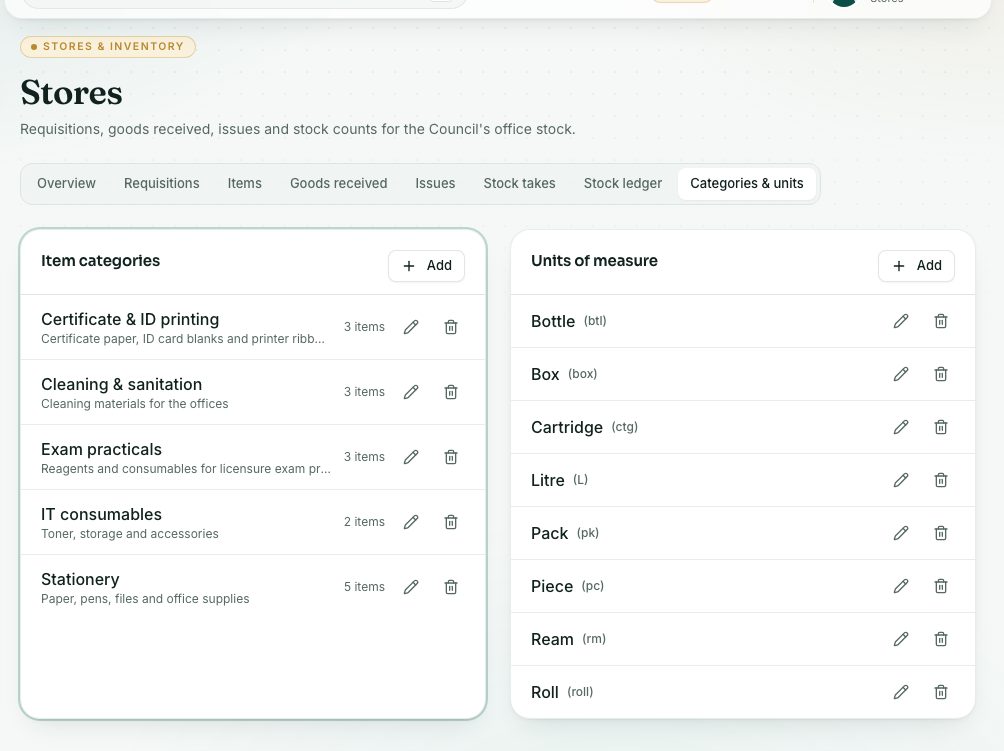
Keep the list of item categories (for example Stationery, Cleaning materials) and units of measure (for example ream, box, piece) that items use.
What you will learn
- Add a category or a unit
- Edit one, or turn it off
- Know what happens when you delete one that is in use
demo.ahpcghana.com/staff/stores/setup?show=categories
Step by step
- In the left menu, open Stores → Item categories (or Unit of measure). Both open the Categories & units tab.
- Press Add on the Item categories card or the Units of measure card.
- For a category, type the Name and an optional Description. For a unit, type the Name and an optional Symbol, for example rm, box or pc.
- Press Save.
- To change one, press its pencil. Untick In use to stop it being picked for new items.
- To delete one, press its bin and confirm with Delete.
What you will see
- Each category shows how many items use it.
- Deleting a category or unit that items use turns it off instead (In use by items, so it was turned off instead), so history stays intact.
Check yourself
Pick an answer for each question, then press Check my answers. Nothing is saved or sent.