
Build an online exam
Create an exam, add sections that draw questions from the bank for every candidate, and set the time, pass mark and what candidates see.
What you will learn
- Create a new exam
- Add sections that draw questions at random
- Always include chosen questions
- Set time, pass mark, navigation and results
- Link the exam to a licensure exam session
Each candidate gets their own paper. A section says where its questions come from (paper, topic, difficulty or type) and how many to draw, so two candidates sitting side by side rarely see the same questions in the same order.
Step by step
- On the Exams tab, press New exam.
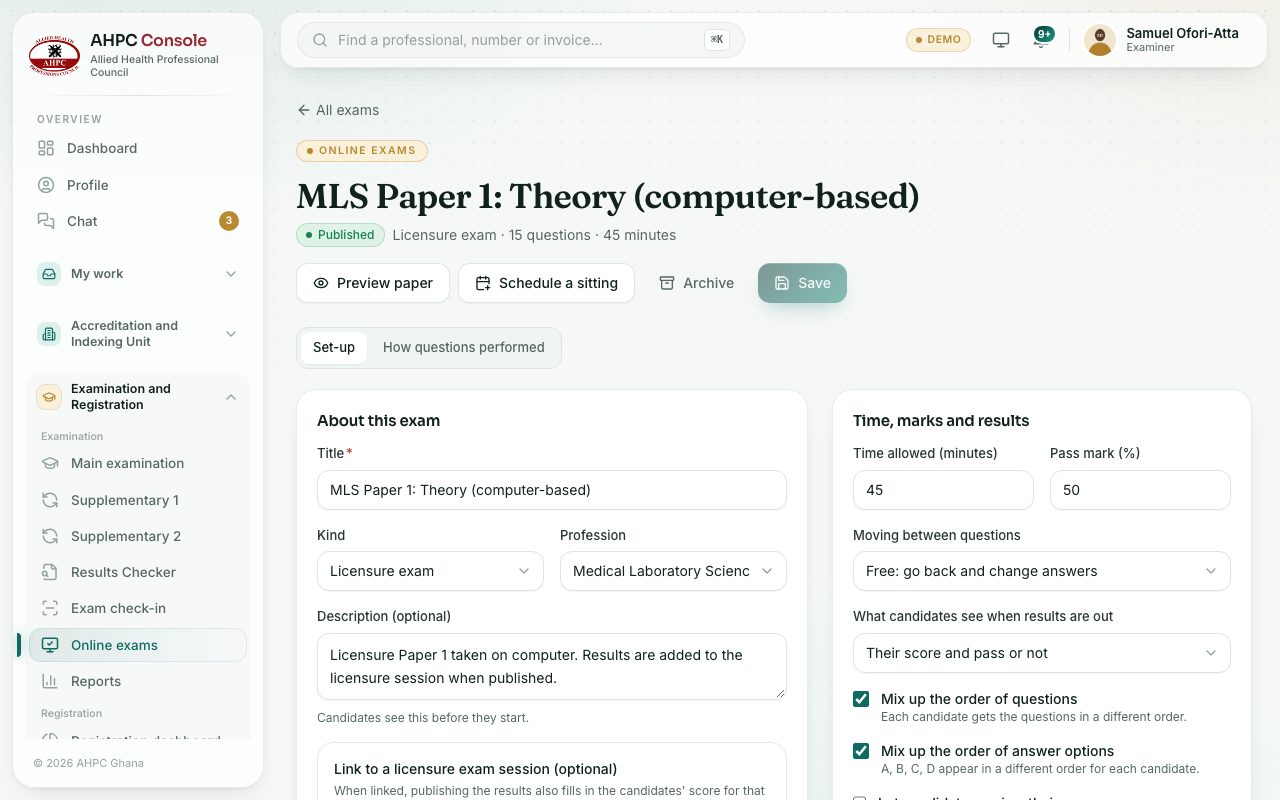
- Type the Title (for example Physiotherapy licensure – Paper 1), choose the Kind and the Time allowed (minutes), and press Create exam.
- In About this exam, choose the Profession and Paper, and add a Description (optional) that candidates read before they start.
- Under Sections, press Add section for each part of the exam:
- Type a Section title.
- Narrow where questions come from with Paper, Topic, Difficulty and Type.
- Set Questions to draw. The section shows how many ready questions match.
- To give every candidate certain questions as well, press Always include and tick them.
- In Time, marks and results, set:
- Time allowed (minutes) and Pass mark (%).
- Mix up the order of questions and Mix up the order of answer options.
- Moving between questions: Free: go back and change answers or One way: no going back.
- What candidates see when results are out, and whether to Let candidates review their answers.
- Press Save.
Kinds of exam
Licensure exam, Indexing (students), End of internship, CPD assessment or Other.
Linking to a licensure exam session
For a licensure paper, choose the session in Link to a licensure exam session (optional) and say which paper of the session this exam is. When the online results are published, the candidates’ scores for that paper are filled in on the session, so their overall licensure result updates on its own.
Check yourself
Pick an answer for each question, then press Check my answers. Nothing is saved or sent.