
The Foreign-trained dashboard
See how many foreign-trained applications came in, where they are now and how much was collected.
What you will learn
- Read the four headline figures
- Filter by date and category
- Download the figures
demo.ahpcghana.com/staff/foreign-trained/dashboard
Step by step
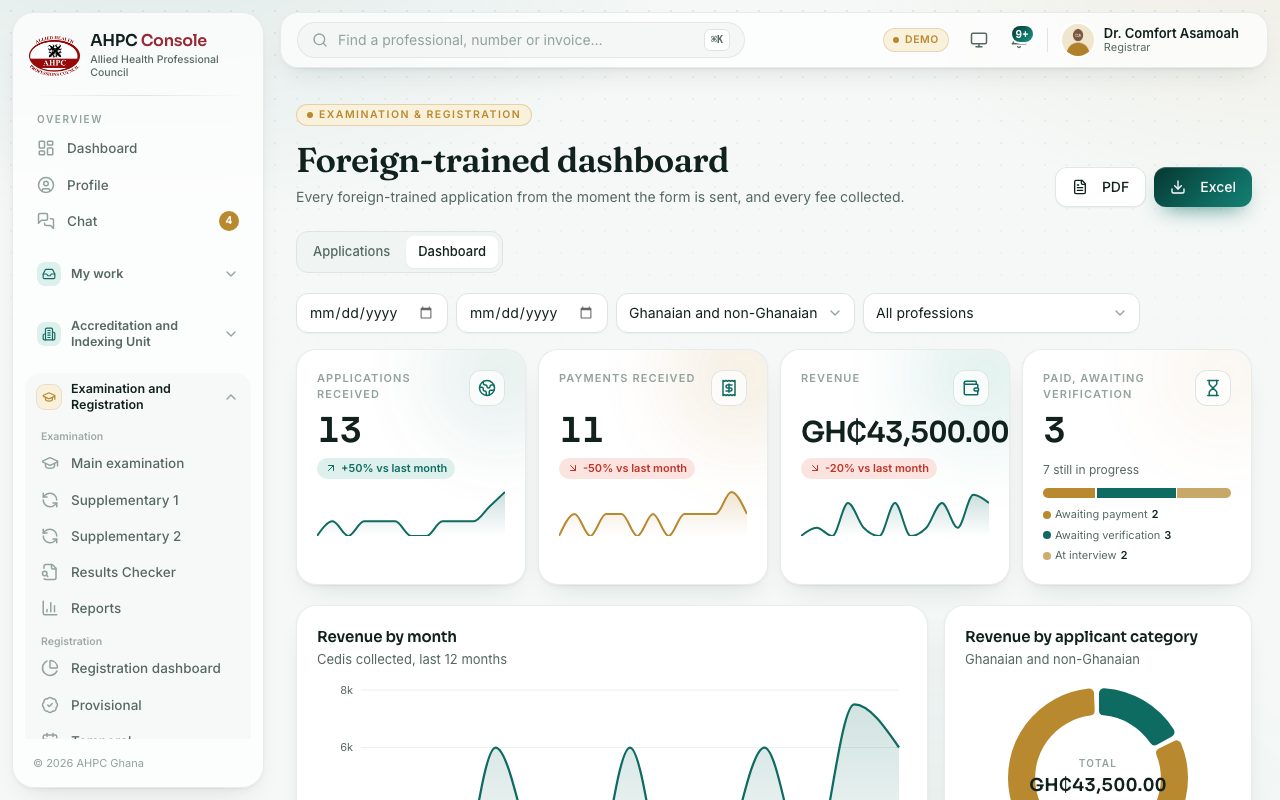
- In the left menu, choose Foreign-trained dashboard. You can also press the Dashboard tab on the applications page.
- Read the headline figures: Applications received, Payments received, Revenue and Paid, awaiting verification.
- Set a From and To date, or pick Ghanaian and non-Ghanaian, to narrow the figures.
- Press PDF or Excel to download. Every download is marked with the Council’s name, your name and the date and time, across the whole page. PDF files carry this watermark on every page. Excel files open read-only: you can read, scroll and filter, but not change them.
What you will see
- Revenue by month, Revenue by applicant category and Revenue by year, all in cedis.
- Application funnel: from form sent to the panel’s approval.
- By status: where every application stands now.
Check yourself
Pick an answer for each question, then press Check my answers. Nothing is saved or sent.