
Keep personnel files
Every member of staff has a personnel file: job, grade, dates, contacts, next of kin, qualifications, documents and career history.
What you will learn
- Find a staff member’s file
- Add a new staff member
- Upload a document and add to the history
- Link a file to the person’s portal sign-in
demo.ahpcghana.com/staff/general-admin/personnel
Step by step
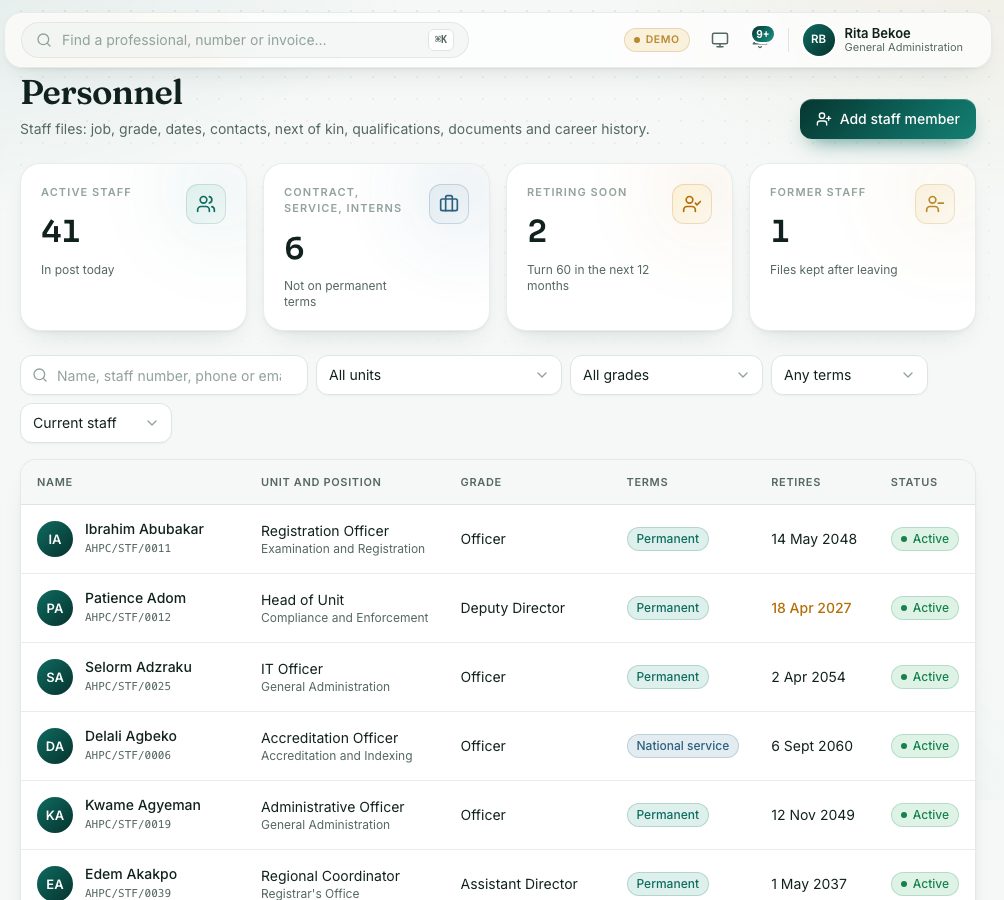
- Open General Administration → Personnel.
- Search by name, staff number, phone or email, or filter by unit, grade, terms and status. The boxes at the top filter too: press Retiring soon or Former staff.
- Click a name to open the file. Its tabs are Profile, Qualifications, Documents, History and Leave and assets.
- To add someone, press Add staff member:
- Personal: First name and Surname are needed. The Date of birth sets the retirement date (age 60).
- Job: leave Staff number empty to get the next number. Choose the Unit, Position, Grade, Office and Supervisor (who approves their leave first) and the Terms.
- Contact and Next of kin: type the next of kin's Name, choose the Relationship from the list (for example Spouse, Mother or Brother; Other relative if theirs isn't listed), and add the Phone and Address.
- Portal account: in Link to a staff sign-in, choose their staff sign-in so they can ask for leave.
- Press Save.
- To upload a paper, open the Documents tab, type a Document title such as Appointment letter and add the file.
- To record a promotion, transfer or other event, open the History tab, press Add to history, choose What happened, type a Summary and press Save.
- To change the file, press Edit file.
What you will see
- The status shows Active, Suspended or Left.
- A change of grade, unit or office is added to the history for you.
- The Leave and assets tab shows this year’s leave, the assets the person holds and their training.
Check yourself
Pick an answer for each question, then press Check my answers. Nothing is saved or sent.