
Reset, unlock or turn off an account
Change someone’s roles, reset a forgotten password, unlock an account after too many wrong passwords, or turn off the account of someone who has left.
What you will learn
- Change a person’s roles
- Reset a password
- Unlock a locked account
- Turn off an account so the person can’t sign in
demo.ahpcghana.com/staff/users
Step by step
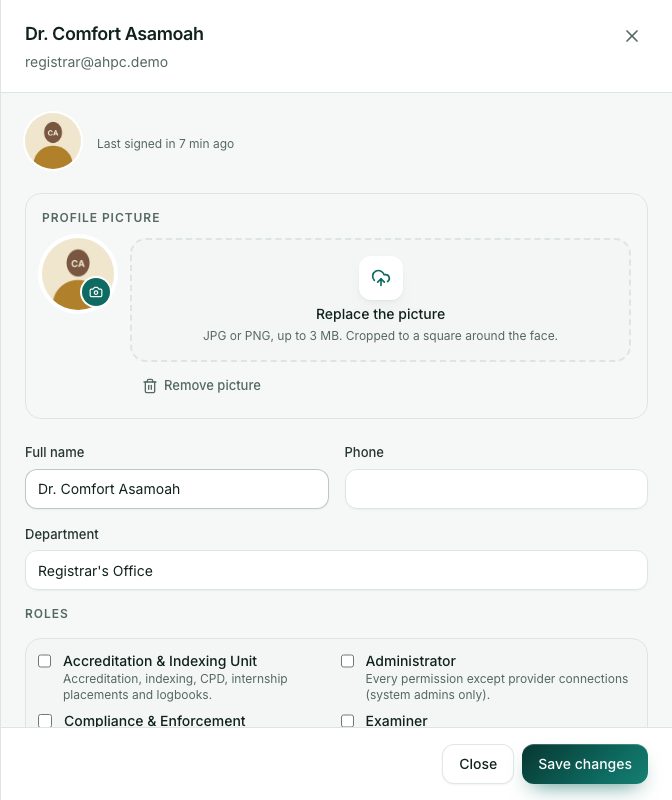
- Open System administration → Staff accounts. Search by name, email or phone, or filter by role. Use the tabs Active, Turned off and All.
- Click the person. Their account opens on the right.
- To change what they can do, tick or untick roles under Roles and press Save changes.
- To reset a forgotten password:
- Press Reset password and confirm.
- A new temporary password is shown once. The person is signed out everywhere.
- Give it to them privately.
- If the account shows Locked after failed sign-ins, press Unlock. The person can try again at once.
- When someone leaves, turn off Account is on and press Save changes. They are signed out and can’t sign in again.
Signing someone out
There is no separate sign-out button. To end someone’s sessions straight away:
- Reset password signs them out everywhere and gives them a new temporary password.
- Turning off Account is on stops the account at once, on every device.
What you will see
- An account locks after 5 wrong passwords in a row and unlocks by itself after 15 minutes. Unlock clears it sooner.
- Recent activity shows the last things the person did in the portal.
- A turned-off account keeps its history. You can turn it back on later.
Check yourself
Pick an answer for each question, then press Check my answers. Nothing is saved or sent.