
The Provisional, Temporal and Permanent queues
Each type of registration has its own queue. Learn how to find the applications waiting for you, and what each tab and column means.
What you will learn
- Open the queue for one type of registration
- Use the tabs to see applications at each stage
- Search and filter by fee, type and profession
- Read the Fee and Status columns
There are three kinds of registration. Provisional is for new graduates. Temporal (shown as Temporary on the screen) is for visiting or foreign-trained professionals for a limited time. Permanent is for provisionally registered professionals who have passed the licensure exam.
demo.ahpcghana.com/staff/registrations?registration_type=provisional
Step by step
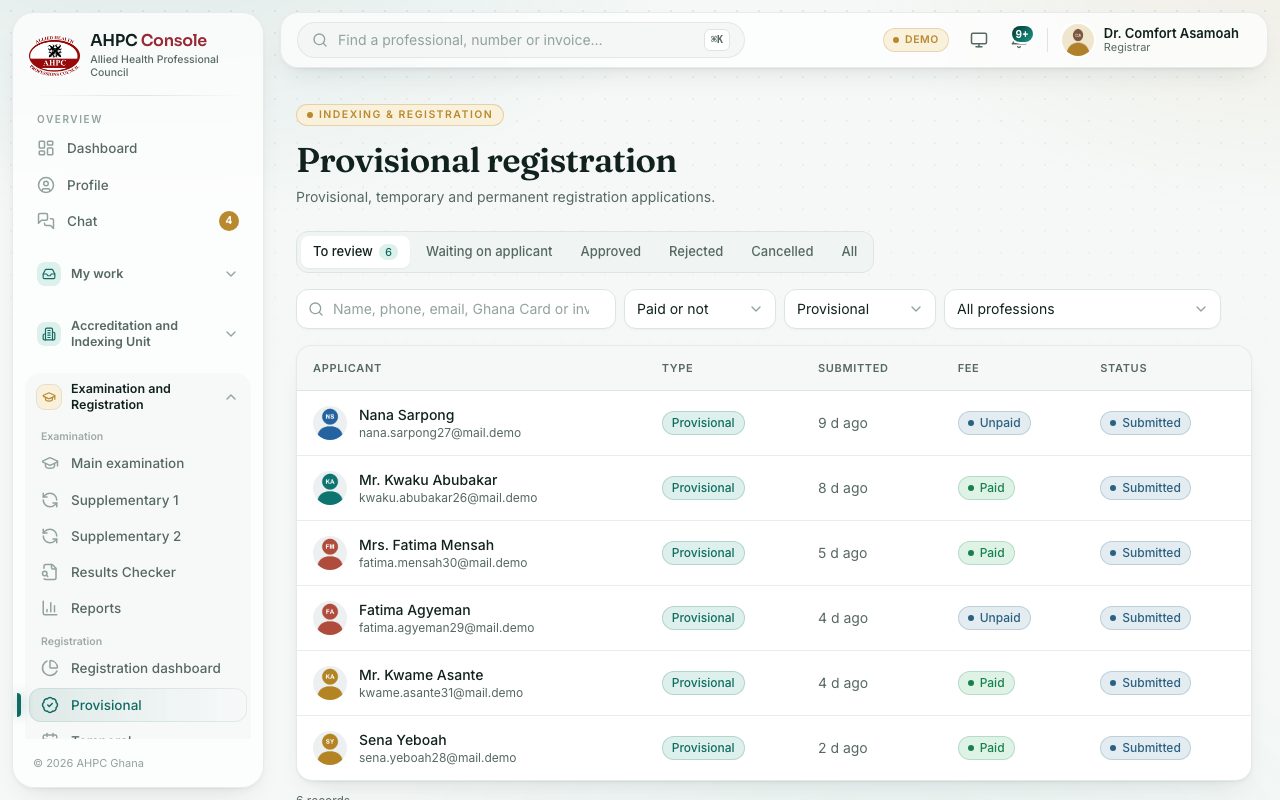
- In the left menu, open Examination and Registration and, under Registration, choose Provisional, Temporal or Permanent.
- Pick a tab:
- To review: sent and waiting for a decision (new, under review or sent back by the applicant). The oldest is at the top.
- Waiting on applicant: you asked for more information.
- Approved, Rejected and Cancelled: finished applications.
- All: everything except drafts.
- To find one person, type in the search box: a name, phone number, email, Ghana Card number, invoice number or registration number.
- Use Paid or not to see only Fee paid or Fee unpaid applications, and All professions to pick one profession.
- Click a row to open the application.
What you will see
- Fee: Paid, Unpaid or No fee. You can’t approve until the fee is paid.
- Status: for example Submitted, Under review, Info needed or Resubmitted. An approved application also shows its new registration number.
- The number next to the tab name is how many applications are on that tab.
Check yourself
Pick an answer for each question, then press Check my answers. Nothing is saved or sent.