
Exam security settings
Choose how strict the exam screen is: full screen, copying, the camera, one device, warnings and what happens when they run out.
What you will learn
- Know what each security setting does for the candidate
- Set the number of warnings and what happens at the limit
- Choose camera and device rules
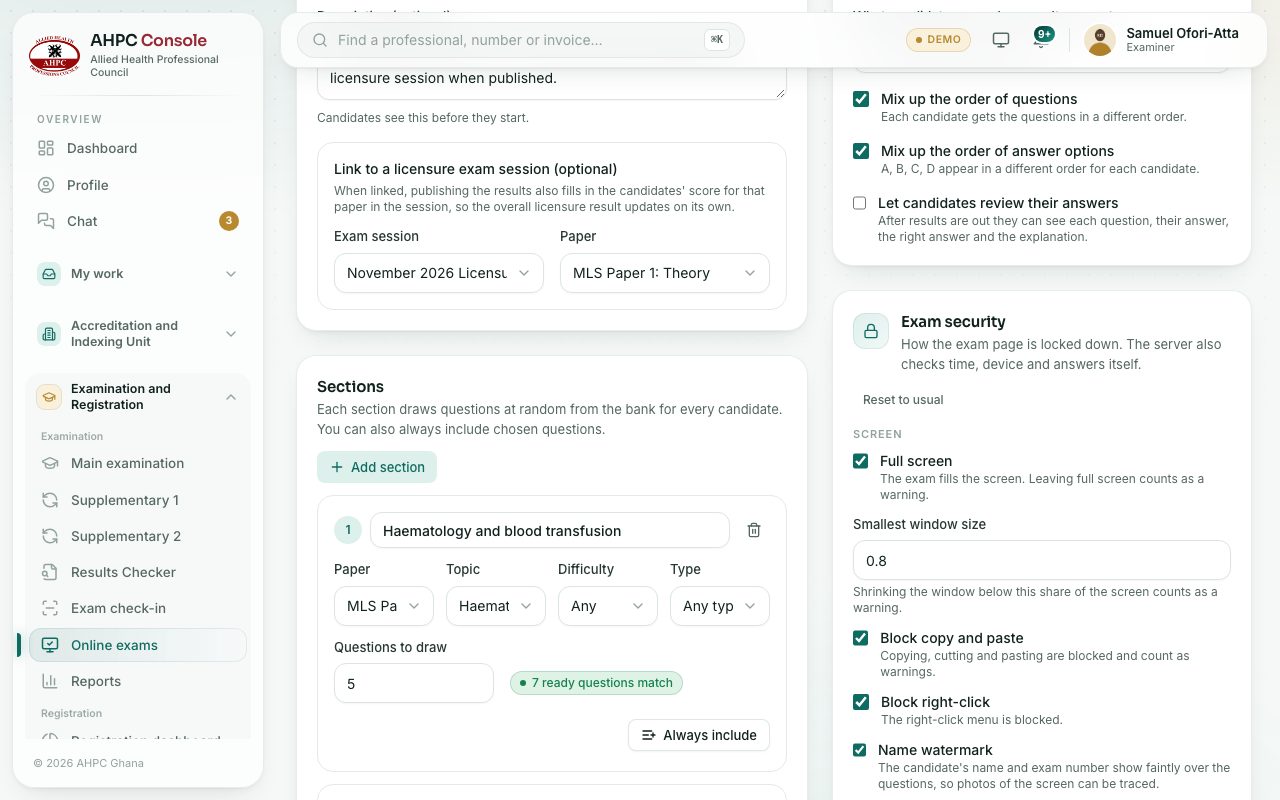
The Exam security box on the exam’s Set-up tab decides how the exam page behaves. Whatever you choose, the Council’s server keeps the official time, decides when the exam ends and only accepts answers from the candidate’s own computer. Press Reset to usual to go back to the usual settings.
Step by step
- Open the exam from the Exams tab and scroll to Exam security.
- Turn each setting on or off and set the numbers. The hint under each one says what the candidate will notice.
- Press Save.
What each setting does
| Setting | What the candidate notices |
|---|---|
| Full screen only | The exam fills the screen. Leaving full screen is a warning. |
| Smallest window allowed | Making the exam window smaller than this share of the screen is a warning. |
| Block copy and paste | Copy, cut and paste don’t work, and each try is a warning. |
| Block right-click | The right-click menu doesn’t open. |
| Name across the questions | Their name and exam number show faintly over the questions, so a photo of the screen can be traced. |
| Warnings allowed | How many warnings they may get. |
| When the limit is reached | Submit the exam, Stop the exam (staff decide later), or Let them carry on, flag for staff. |
| Camera on / Photo every (seconds) | The camera stays on and takes a photo now and then. |
| Face check before starting | They take a quick picture that is compared with their passport photo before the exam opens. |
| One device only | The exam opens on one computer only. To move, they ask the invigilator. |
| Allow phones | Off: they are asked to use a computer. |
| Safe Exam Browser required | They must open the exam in the free Safe Exam Browser app, which locks the computer during the exam. |
| Venue internet addresses | For venue sittings: only computers on the venue’s network can start. |
What counts as a warning
Leaving full screen, switching to another tab or app, clicking outside the exam, copying or pasting, right-clicking, trying to take a screenshot or print, making the window small, nobody or more than one person on camera, and trying to open the exam on another device. The candidate sees each warning and how many they have left.
Check yourself
Pick an answer for each question, then press Check my answers. Nothing is saved or sent.