
Main examination and Supplementary sittings
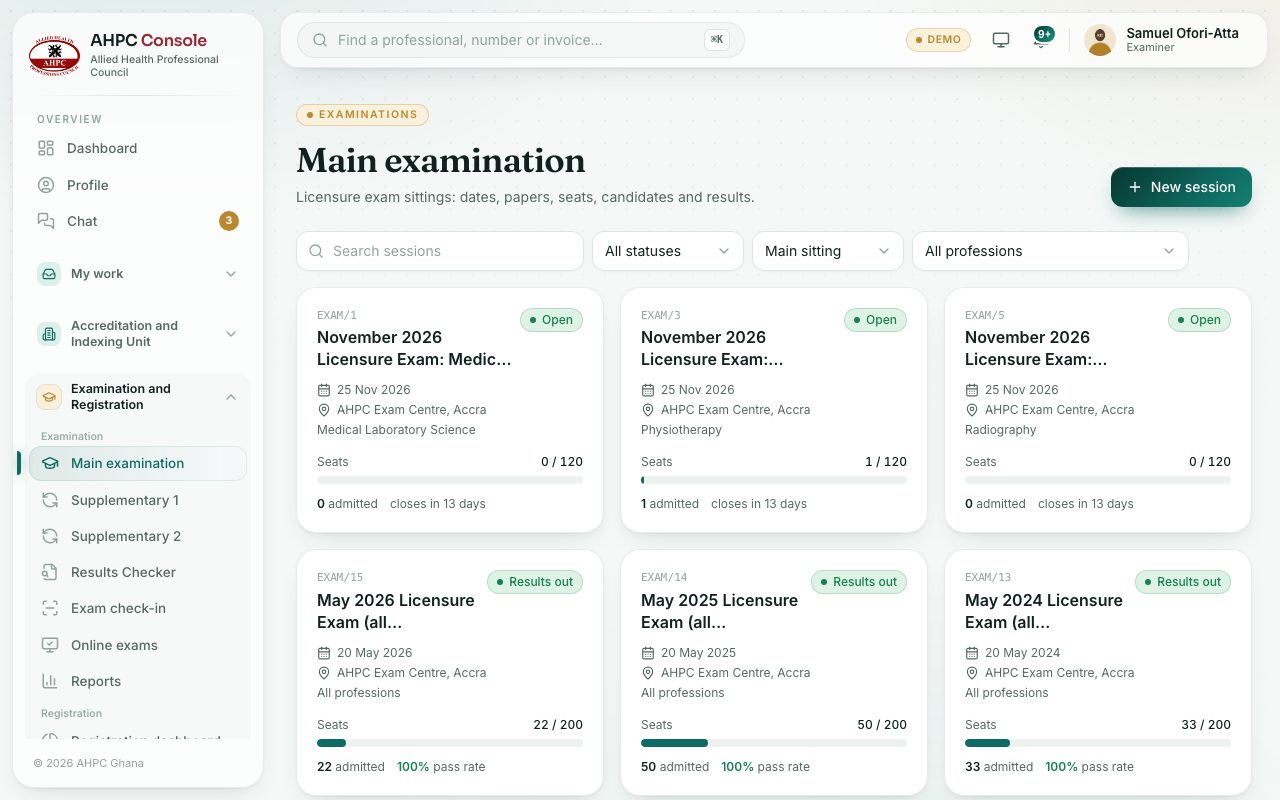
See every licensure exam session as a card: its date, venue, seats taken, candidates admitted and pass rate.
What you will learn
- Open the main and supplementary sittings
- Read a session card
- Filter sessions by status, type and profession
The Main examination is the first sitting. A candidate who doesn’t pass can resit at a supplementary (resit) sitting. Supplementary 1 and Supplementary 2 both list the resit sessions: the first shows candidates on their second attempt, and the second shows candidates on their third attempt when you open a session.
demo.ahpcghana.com/staff/exams?exam_type=primary
Step by step
- In the left menu, open Examination and Registration and, under Examination, choose Main examination, Supplementary 1 or Supplementary 2.
- Use Search sessions, All statuses, Main and resit and All professions to narrow the list.
- Click a card to open the session.
What you will see
- Each card shows its number (for example EXAM/12), title, status, exam date, venue and profession (All professions when it is open to everyone).
- Seats: seats taken out of the seat limit, with a bar.
- How many are admitted, how many are awaiting payment, the pass rate once results are in, and “closes in … days” while open.
- Statuses: Draft, Open, Closed, Completed, Results out and Cancelled. A Resit badge marks a supplementary sitting.
Check yourself
Pick an answer for each question, then press Check my answers. Nothing is saved or sent.