
Suspend, reinstate or strike off a professional
Change a professional’s standing on the register. The change shows at once on public checks.
What you will learn
- Suspend a registered professional
- Strike someone off the register
- Reinstate a suspended or struck-off professional
demo.ahpcghana.com/staff/professionals?status=suspended
Step by step
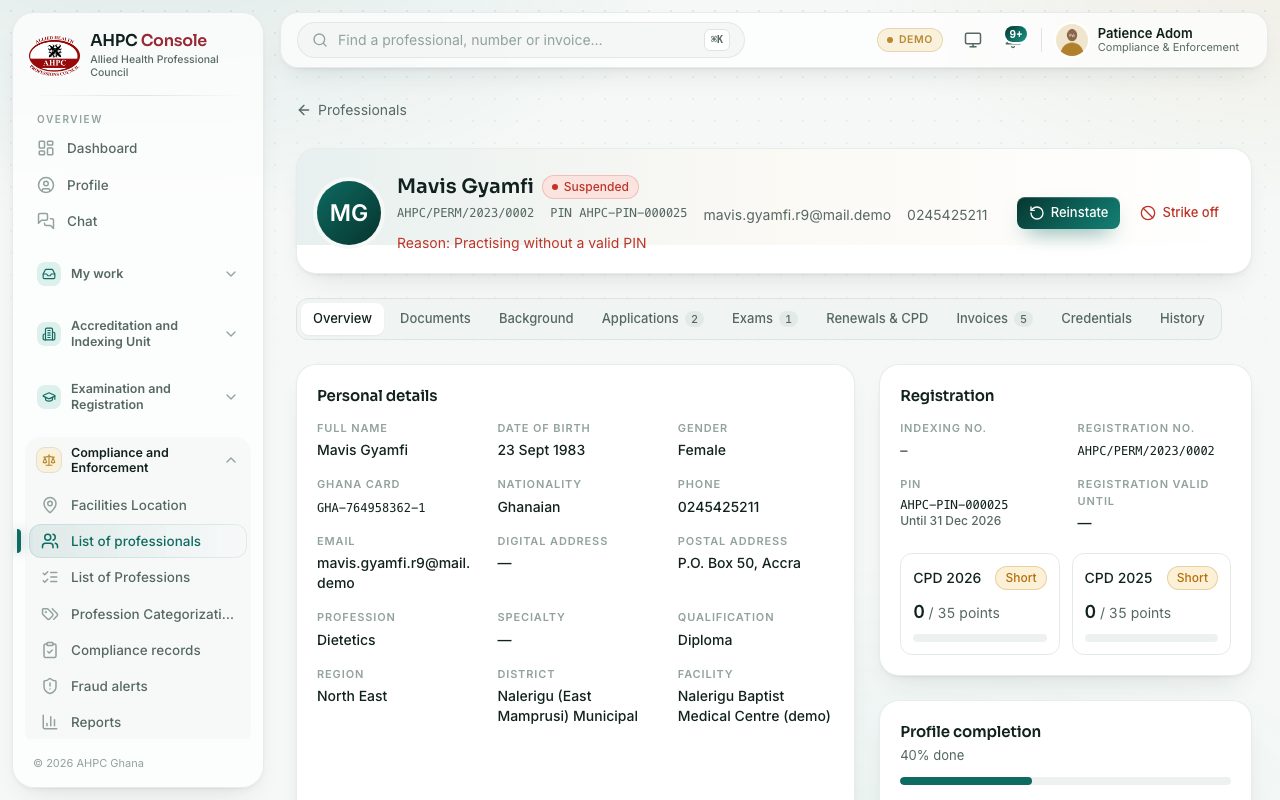
- Open Compliance and Enforcement → List of professionals and press the professional’s name.
- On the top card, press one of:
- Suspend: for someone who is provisionally, temporarily or permanently registered.
- Strike off: removes the person from the register.
- Reinstate: shown only for someone who is suspended or struck off.
- Type the Reason. It is required to suspend or strike off, and optional to reinstate.
- Confirm with Suspend, Strike off or Reinstate.
What you will see
- Suspended: they show as not in good standing on public checks until reinstated.
- Struck off: they are removed from the register. Only reinstating reverses it.
- Reinstated: they return to their registered status and show as in good standing.
- The change and your reason are added to the History tab.
Check yourself
Pick an answer for each question, then press Check my answers. Nothing is saved or sent.