
Review CPD activities
Check the evidence for each CPD activity and approve the points, one by one or several at once.
What you will learn
- Open the CPD activities waiting for review
- Filter by provider type and source
- Approve or not approve an activity
- Approve several activities together
Professionals add their CPD (continuing professional development) activities in their portal, with a certificate or other evidence. Activities from an uploaded attendance or association list arrive already approved. Approved points count towards the next PIN renewal. Most professionals need 40 points a year.
demo.ahpcghana.com/staff/cpd
demo.ahpcghana.com/staff/cpd
Step by step
- Open Accreditation and Indexing Unit → CPD → CPD review. The page is called CPD activities and shows Waiting for review.
- Search by name, activity or provider. Narrow by year, Any provider type or Any source (added by the professional, or from a list).
- Press an activity to open it on the right.
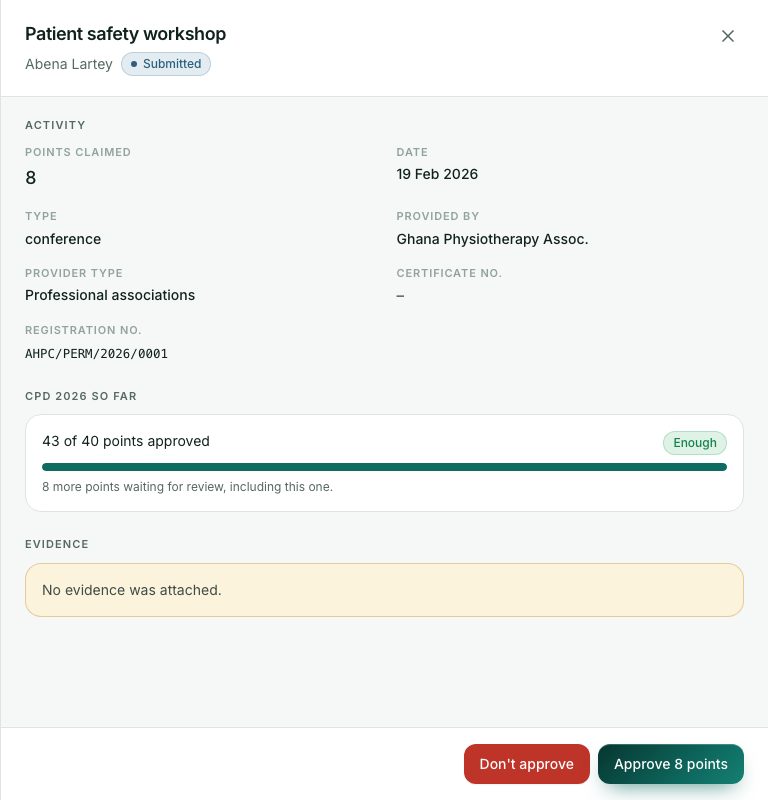
- Read the activity: points claimed, date, type, provider and certificate number. Look at the evidence; press Open in new tab for a bigger view.
- Decide:
- Press Approve … points, add a note if you like, and confirm.
- Or press Don’t approve and give the reason. The professional sees it.
- To approve several at once, tick them in the list and press Approve … selected.
What you will see
- The professional’s points so far this year show as, for example, 32 of 40 points approved, with Enough or 8 to go.
- Evidence: None in the list means no file was attached. Check carefully before approving.
Check yourself
Pick an answer for each question, then press Check my answers. Nothing is saved or sent.