
Indexing in four steps: the summary
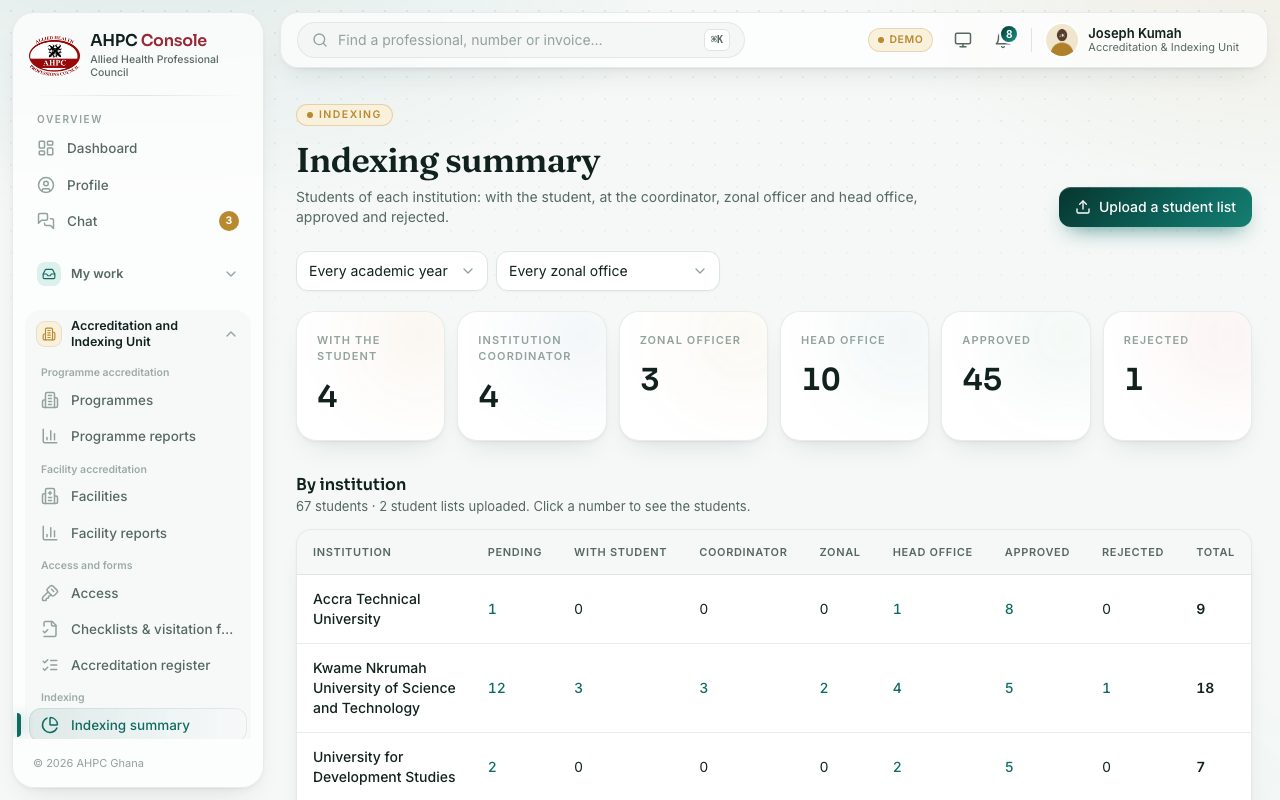
See how indexing moves from the student to the coordinator, the zonal officer and head office, and read the summary.
What you will learn
- Name the four desks of indexing
- Read the summary counters
- Open the students at one desk for one institution
Indexing now starts with head office, not the student.
1. Head office uploads each institution’s list of students. Each student gets their own sign-in. 2. The student signs in, completes their details, uploads their WAEC result slips (up to four) and documents, and sends the application. 3. The institution coordinator checks it in the partner area and approves it, then the zonal officer verifies it. 4. Head office checks each WAEC slip against WAEC’s records and gives final approval, which issues the index number and certificate.
demo.ahpcghana.com/staff/indexing
Step by step
- Open Accreditation and Indexing Unit → Indexing → Indexing summary.
- Pick an academic year or a zonal office to narrow the figures.
- Read the counters: With the student, Institution coordinator, Zonal officer, Head office, Approved and Rejected. Press one to list those students.
- In By institution, press any number to see those students on the verification desks.
- Under Reports, press Indexing by institution or Indexing students for a report you can download.
What you will see
- By institution says how many students and how many student lists are on the portal.
Check yourself
Pick an answer for each question, then press Check my answers. Nothing is saved or sent.