
Check the accreditation register
See every training institution and health facility, whether it is accredited and until when.
What you will learn
- Open the register
- Switch between institutions and facilities
- Find who is expiring or has lapsed
demo.ahpcghana.com/staff/accreditation/register
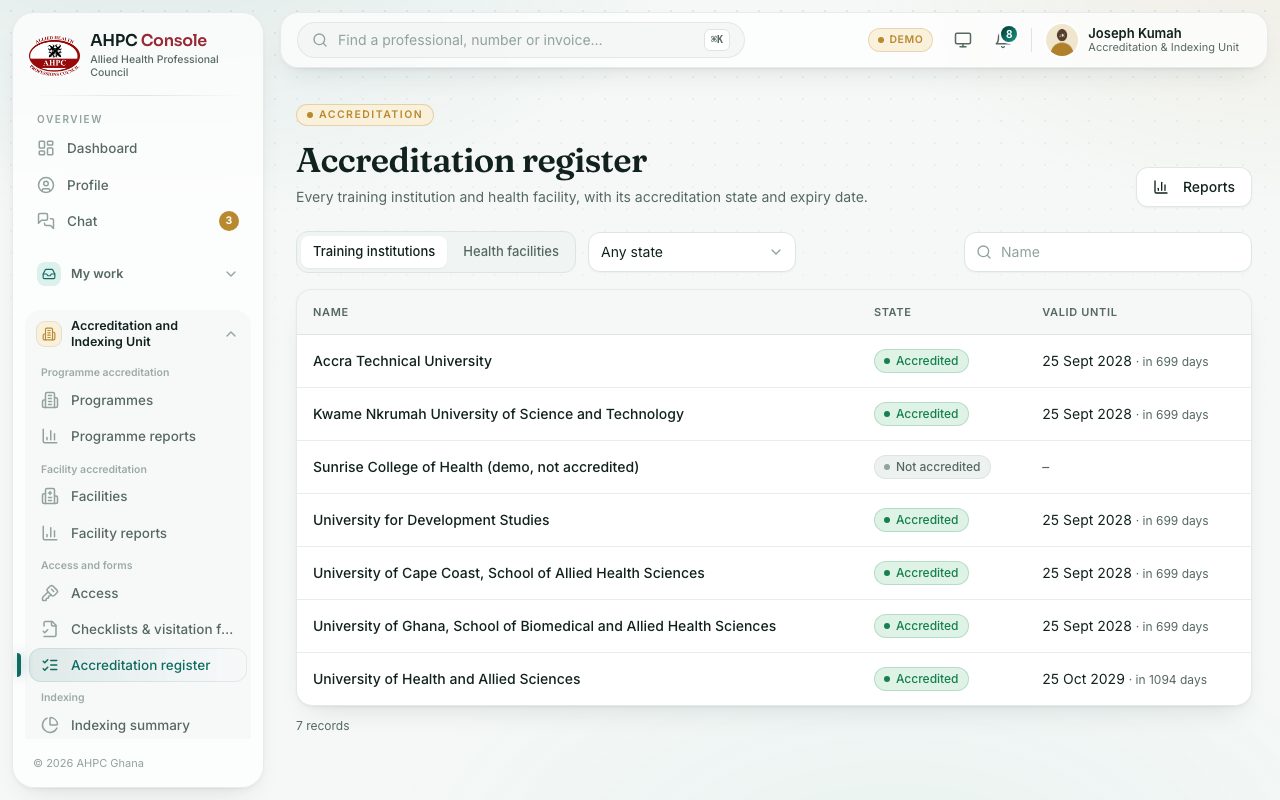
Step by step
- Open Accreditation and Indexing Unit → Access and forms → Accreditation register.
- Choose Training institutions or Health facilities.
- Pick a state: Accredited, Expiring in 90 days, Lapsed or Never accredited.
- Search by name. Press Reports for the register as a report you can download.
What you will see
- Accredited (green), Expiring soon (amber), Lapsed (red) and Not accredited (grey).
- In Valid until, the date turns amber as it nears and red once it has passed.
Check yourself
Pick an answer for each question, then press Check my answers. Nothing is saved or sent.