
Manage internship placements
Upload the placement list for an intake, filter the placements, and add or change one placement.
What you will learn
- Upload the full placement list for an intake
- Filter placements by intake and induction
- Add or edit one placement
A placement records where an intern is posted, for how long, and who supervises them. Upload the whole intake’s list once; after that, change any placement on its own.
demo.ahpcghana.com/staff/internship?tab=placements
demo.ahpcghana.com/staff/internship?tab=placements
Step by step
- Open Accreditation and Indexing Unit → Internship → Placements. The page shows Internship placements.
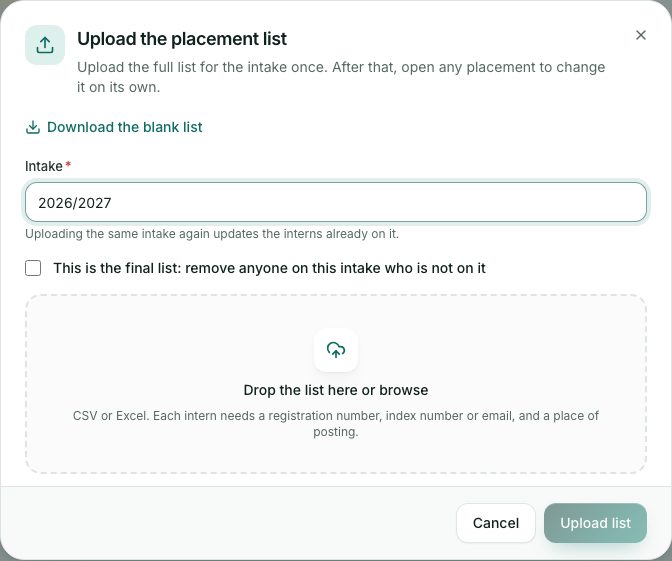
- To upload the intake’s list, press Upload full list:
- Press Download the blank list if you need the template.
- Type the Intake, for example 2026/2027. Uploading the same intake again updates the interns already on it.
- Tick This is the final list: remove anyone on this intake who is not on it only for the final list.
- Drop the file (CSV or Excel) and press Upload list. A box says how many were added, updated or removed, and lists rows with problems.
- Filter with All intakes, posting type, region or induction (Attended induction or No induction yet), or search by name, place or supervisor.
- To add one placement, press Add placement:
- Find the professional by name, registration or indexing number.
- Pick the Facility (or type the Place of posting), the region, district, Posting type, Intake and dates.
- Tick Attended the induction and add the date if they have. Add the supervisor and head of department, then save.
What you will see
- The counters at the top: Waiting for review, Placements and Interns without induction.
- On a placement page: Edit, Open profile and the bin button. Deleting a placement keeps the logbooks on the record.
Check yourself
Pick an answer for each question, then press Check my answers. Nothing is saved or sent.