
See who checked your registration
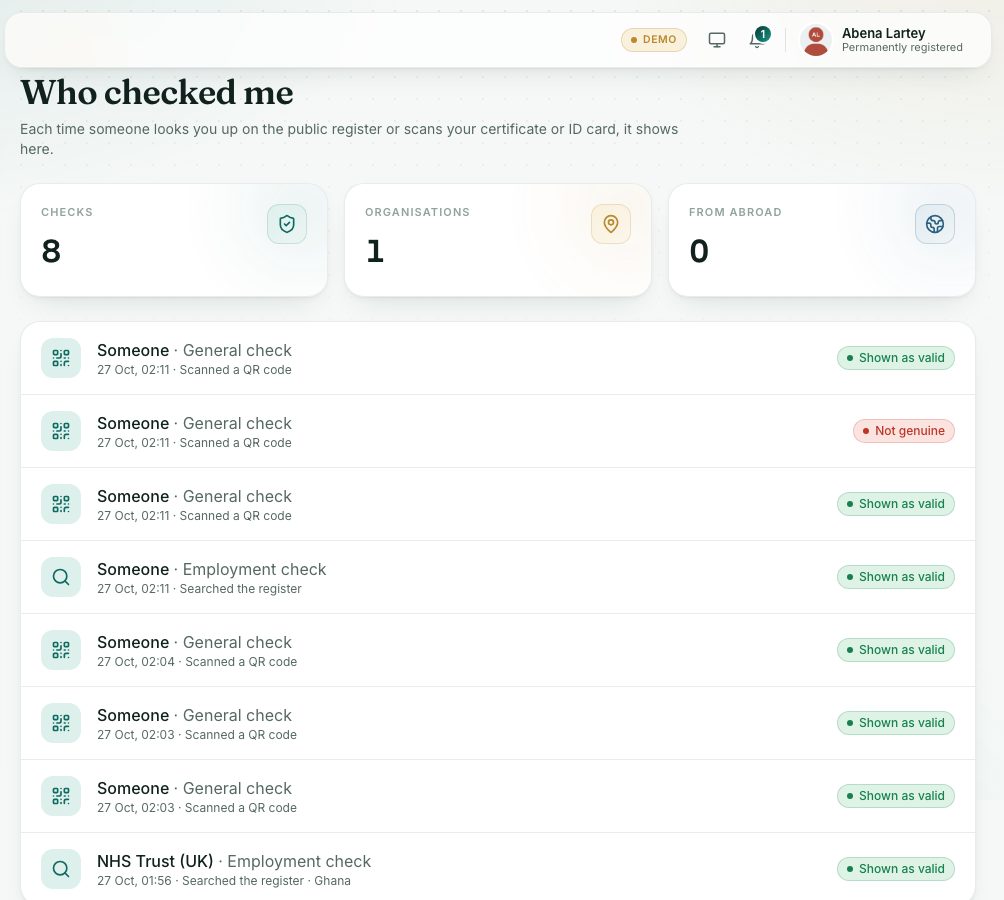
Each time someone looks you up on the public register or scans your certificate or ID card, it shows here.
What you will learn
- Open Who checked me
- Read each check: who, why, how and when
demo.ahpcghana.com/portal/verifications
Step by step
- Press Who checked me under Records in the left menu (or the shortcut on the dashboard).
- Read the totals: Checks, Organisations and From abroad.
- Read each line below. Newest first.
What you will see
- The organisation (or Someone when none was given) and the purpose: Employment check, Licence check, Registration or General check.
- How: Searched the register or Scanned a QR code, with the date, time and country when known.
- The result the checker saw, for example Shown as valid.
- No checks yet: No one has checked you yet.
Check yourself
Pick an answer for each question, then press Check my answers. Nothing is saved or sent.