
Download your certificates
Download a digital copy of every Council certificate. Each is digitally signed by the Council, with a QR code employers scan to confirm it is genuine.
What you will learn
- Find your certificates
- Download a digital copy
- Know what to do if one needs replacing
demo.ahpcghana.com/portal/certificates
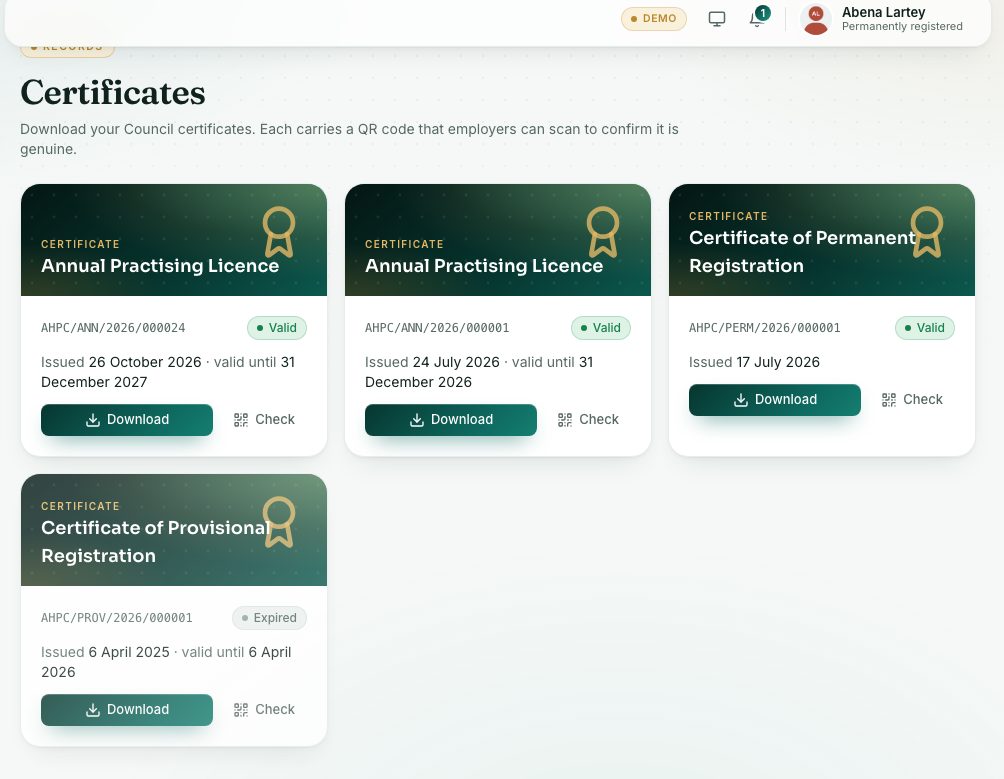
Step by step
- Press Certificates under Records in the left menu.
- Find the certificate. Each card shows its title, number, issue date and valid until date when it has one.
- Press Download to save the PDF.
- Press Check to open the public check for that certificate, as an employer would see it.
Digitally signed
The QR code on each certificate carries its details and the Council’s digital signature. When an employer scans it, the check page says Genuine — signed by the Allied Health Professional Council if nothing was changed, or Not genuine if the details or the code were altered. A check code is printed beside the QR code, so someone without a scanner can type it on the check page.
What you will see
- Certificates you may have: Indexing Confirmation, Certificate of Provisional Registration, Certificate of Temporary Registration, Certificate of Permanent Registration, Certificate of Internship and Annual Practising Licence.
- Statuses: Valid, Expired and Revoked (with the reason). A revoked certificate can’t be downloaded.
- No certificates yet? You receive one when you are indexed, registered or renew your PIN.
Check yourself
Pick an answer for each question, then press Check my answers. Nothing is saved or sent.