
Record your internship and upload logbooks
Keep your posting details current, add your preceptor, upload each signed logbook and your signed oath, and follow your progress to completion.
What you will learn
- Add your placement and record the induction
- Add your preceptor
- Upload a logbook or your signed oath as a file
- Fix and send again a rejected upload
- Know when the Council confirms your internship as completed
The Council puts you on an internship list by intake and posting. On this page you keep your own record: where you are posted, who supervises you, and the signed logbooks and oath you upload as files.
demo.ahpcghana.com/portal/internship
Step by step
- Press Internship under Registration in the left menu.
- Under Downloads, get the forms the Council provides, for example the Internship logbook (soft copy), the Oath of professional conduct form and the Internship guidelines.
- Press Add placement and fill in where you are posted:
- Place of posting (required), Facility, Region, District and Posting type.
- Start date and End date.
- Tick Attended the induction and give the Induction date once you have attended it.
- Your Supervisor and Head of department, with their phone or email.
- Under Preceptors, press Add and type the Full name of the qualified professional who supervises your daily work, with their Profession, Registration number, Phone, Email, Placement, Department or unit and dates. Press Save.
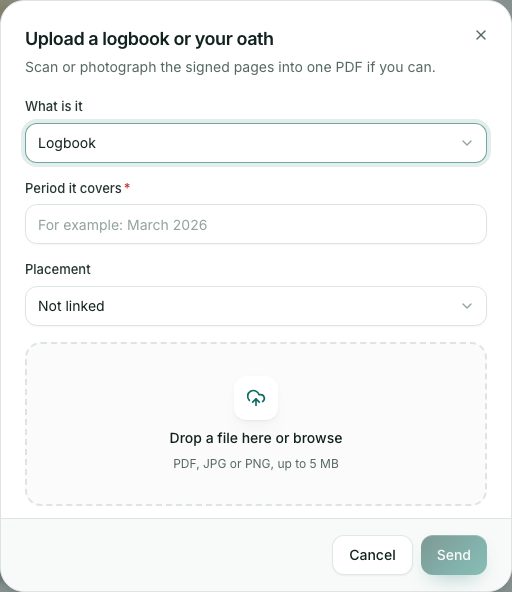
- Press Upload for each logbook period and for your oath:
- What is it: Logbook or Signed oath.
- For a logbook, type the Period it covers, for example March 2026.
- Choose the Placement if you have more than one.
- Drop the file on the box or press it to browse: PDF, JPG or PNG, up to 5 MB. Then press Send.
- Scan or photograph the signed pages into one PDF if you can.
demo.ahpcghana.com/portal/internship
What you will see
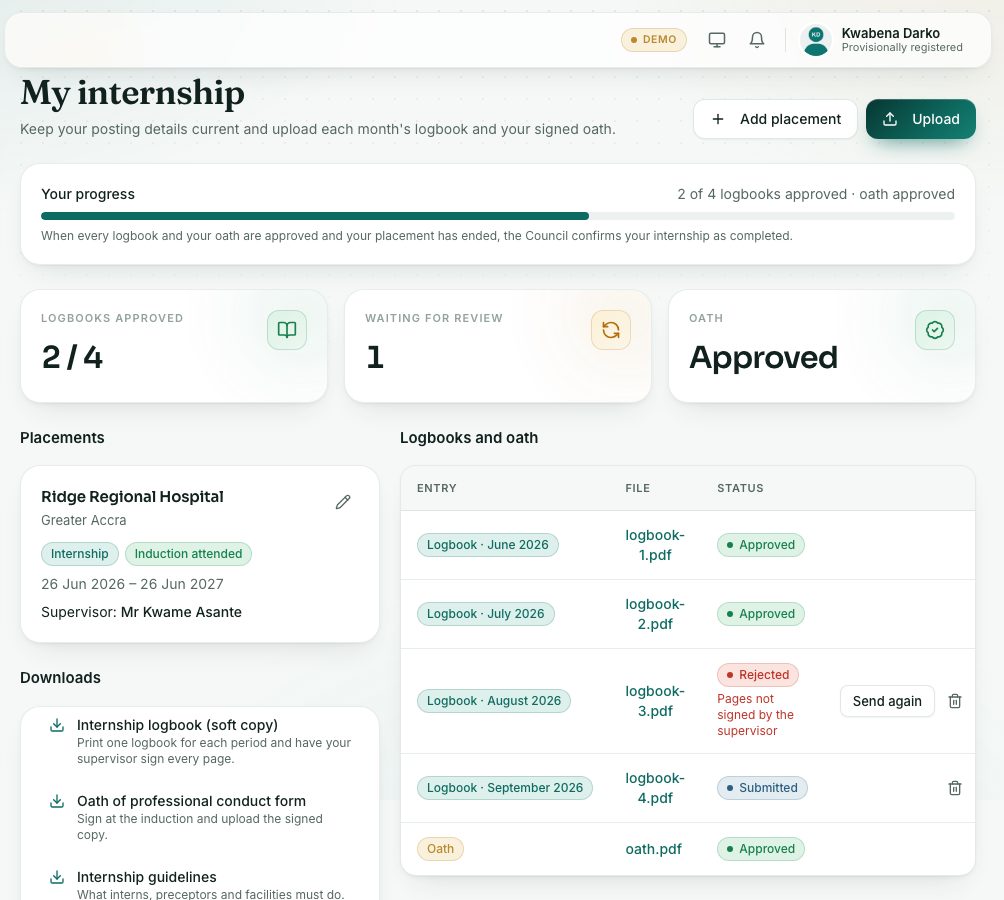
- Your progress: for example 2 of 4 logbooks approved · oath approved, with a bar.
- At the top: Logbooks approved, Waiting for review and Oath (Not yet, With the Council or Approved).
- Each placement shows Induction attended or Induction not recorded.
- Under Logbooks and oath, each upload shows its period, the file (press it to open it) and Submitted, Approved or Rejected. A rejected one shows the Council’s comment and a Send again button.
- When every logbook and your oath are approved and your placement has ended, the Council confirms it: Internship completed. A Certificate of Internship then appears in Records → Certificates.
Check yourself
Pick an answer for each question, then press Check my answers. Nothing is saved or sent.