
Check the system status
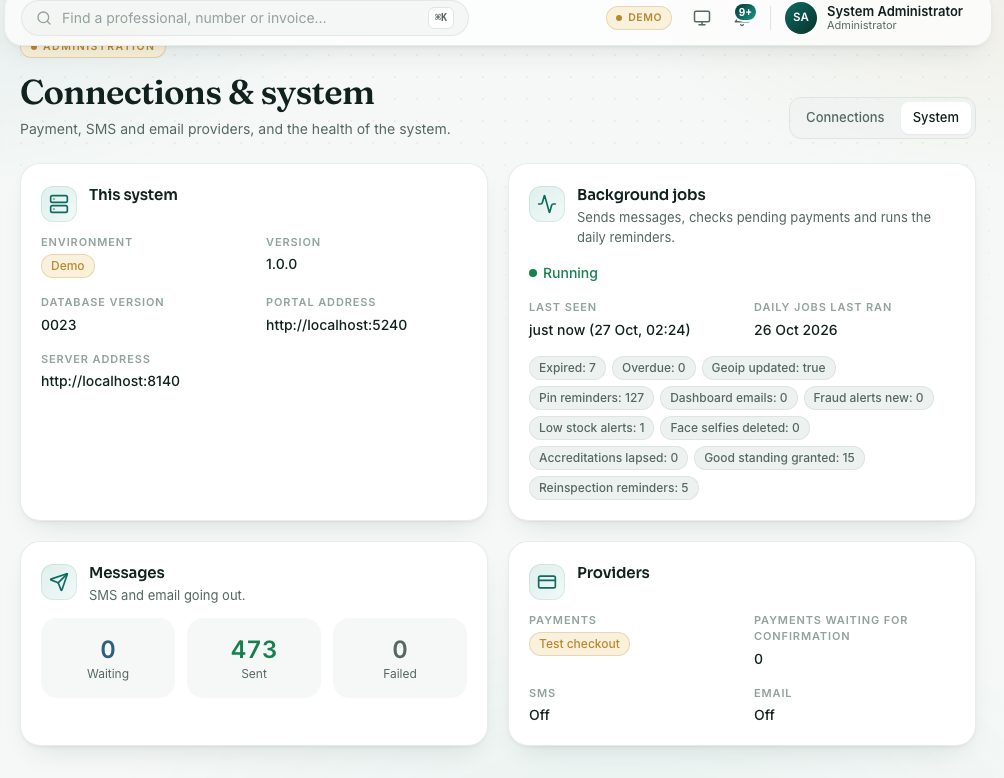
The System tab shows whether this is the live or demo portal, whether the background jobs are running, the messages going out and the providers in use.
What you will learn
- Open the System tab
- Read the background jobs and message counts
- Know when to call your technical team
demo.ahpcghana.com/staff/settings
Step by step
- Open System administration → Connections & system and press the System tab at the top right.
- This system shows whether it is Live or Demo, the version and the portal address.
- Background jobs sends messages, checks pending payments and runs the daily reminders. It should say Running.
- Messages shows how many SMS and emails are Waiting, Sent and Failed.
- Providers shows how payments, SMS and email are set up, and how many payments are waiting for confirmation.
What you will see
- The page refreshes by itself every 30 seconds.
- If background jobs say Not running, messages and payment checks wait until they run again.
Check yourself
Pick an answer for each question, then press Check my answers. Nothing is saved or sent.