
Set up renewal periods
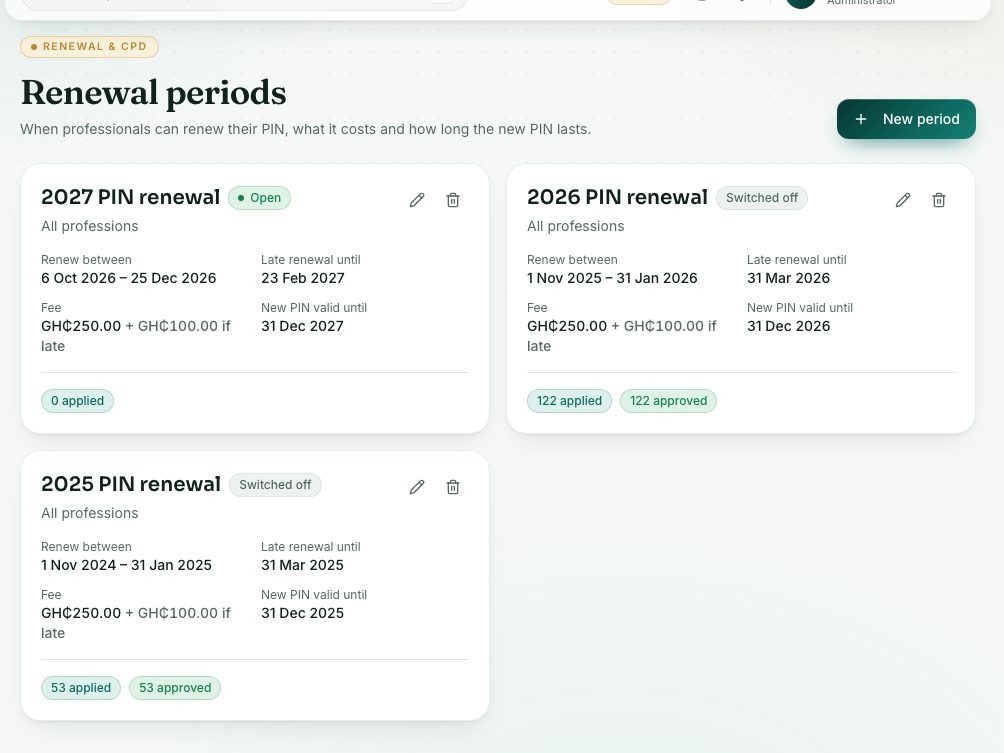
A renewal period sets when professionals can renew their PIN, the fee and late penalty, and how long the new PIN lasts.
What you will learn
- Create a renewal period
- Set the normal and late dates and the fees
- Switch a period off
demo.ahpcghana.com/staff/renewal-periods
Step by step
- Open System administration → Renewal periods.
- Press New period. The form is filled in for next year to start with.
- Check or change:
- Title, for example 2027 PIN renewal, and the Licence year the new PIN covers.
- Profession: leave it on All professions, or pick one profession for its own period.
- Opens, Normal closing date and Late renewal closes (leave empty for no late window).
- New PIN valid until.
- Renewal fee (GH₵) (needed) and Late penalty (GH₵).
- Leave Switched on ticked so professionals can see it when it opens.
- Press Save.
What you will see
- Each card shows Open, Late window, Closed or Switched off, and how many have applied, are waiting, approved or rejected.
- A period with renewals can’t be deleted. Pressing delete switches it off instead.
Check yourself
Pick an answer for each question, then press Check my answers. Nothing is saved or sent.