
Roles and permissions
A role is a set of permissions. Change what a built-in role can do, or make a new role for a job that doesn’t fit the others.
What you will learn
- Read what a role can do
- Change a role’s permissions
- Create or delete a role
demo.ahpcghana.com/staff/roles
Step by step
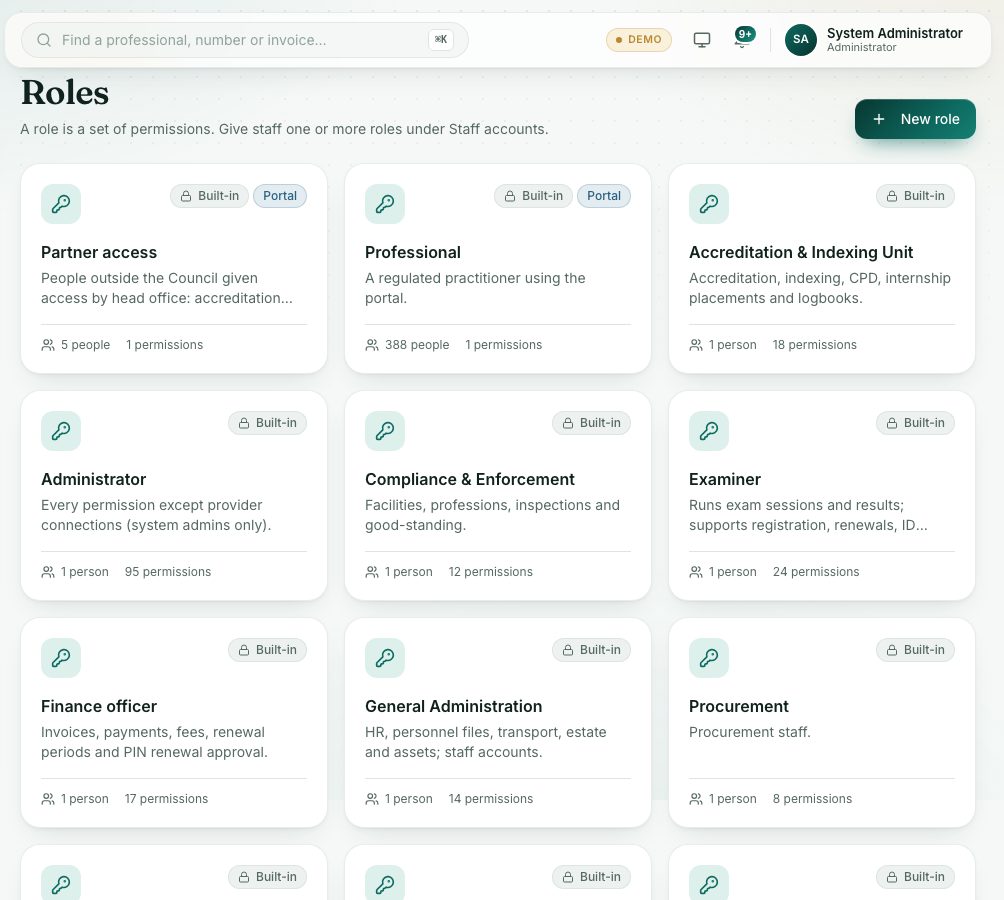
- Open System administration → Roles.
- Each card is a role. Built-in roles came with the portal; Portal marks the professionals’ role.
- Click a role. Its permissions are listed in groups, with how many are chosen in each group.
- Type in Find a permission… to find one quickly. Tick or untick permissions. Select all and Clear work on a whole group.
- Press Save role.
- To make a new role, press New role, type a Name and Description, tick its permissions and press Create role.
What you will see
- A built-in role’s name is fixed, but you can change what it can do.
- A changed role applies to everyone who has it, the next time they open a page.
Check yourself
Pick an answer for each question, then press Check my answers. Nothing is saved or sent.