
Taking the exam
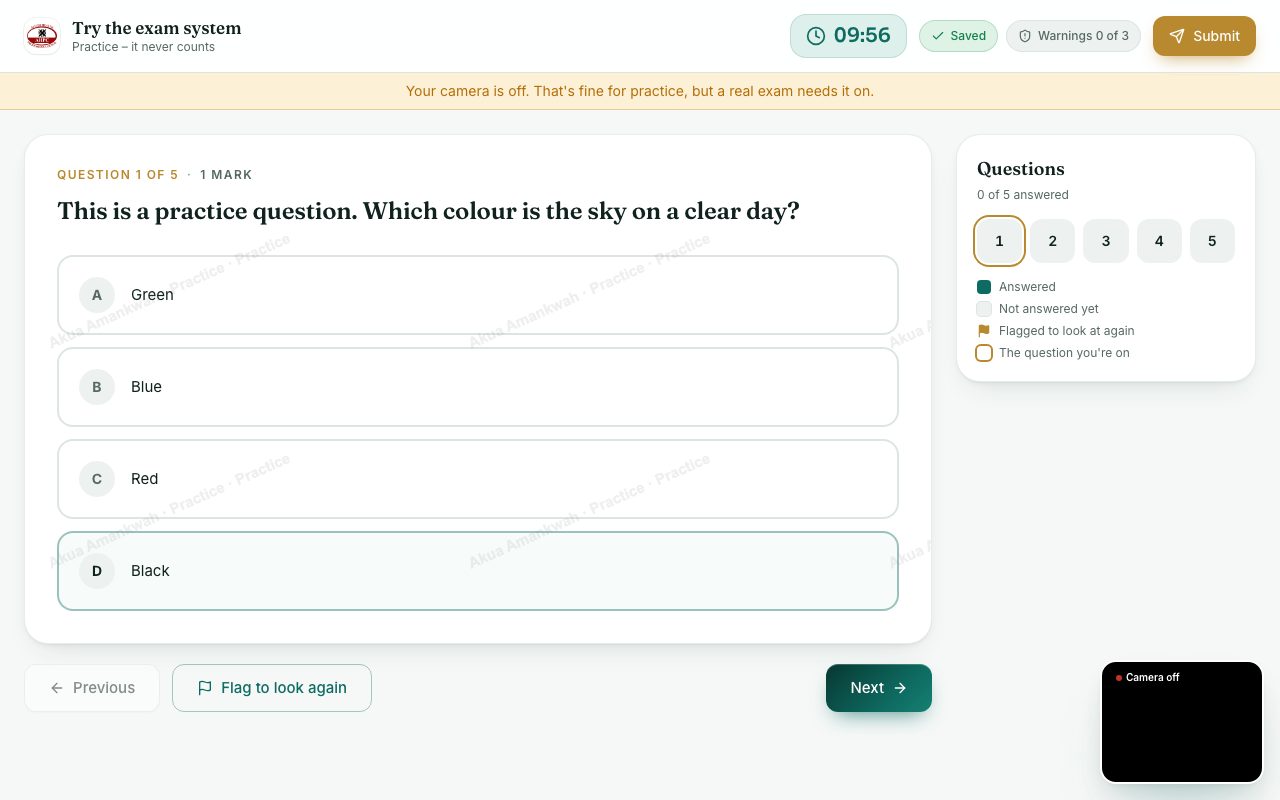
Answer the questions on the full-screen exam page: your answers save as you go, the clock is at the top, and you hand in when you finish.
What you will learn
- Find your way round the exam screen
- Know how saving works and what happens if the connection drops
- Keep an eye on the time
- Hand in your answers
The exam page fills the whole screen, outside the usual portal. It doesn’t sign you out after 5 minutes like the rest of the portal: while your exam is open, you stay signed in, however long you spend on a question.
demo.ahpcghana.com/portal/exams/online
demo.ahpcghana.com/portal/exams/online
Step by step
- Read the question and choose your answer, or type it. For Choose every answer that is right, you only get the marks if all your choices are right.
- Press Next (or Save and next) to move on, or click a number in Questions on the right to jump to any question.
- Not sure? Press Flag to look again. Flagged questions are marked in the list so you can come back.
- Keep an eye on the clock at the top. When the time is up, your answers are handed in automatically.
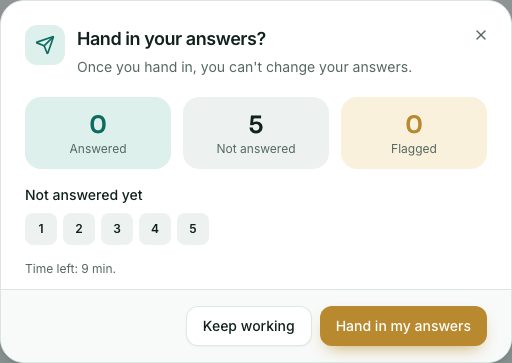
- When you have finished, press Submit at the top right. The box lists any questions you haven’t answered. Press Hand in my answers.
- You see Your answers are in. Your result will show in Online exams when the Council publishes it. You can close the page.
Saving and the connection
- Every answer is saved as you go; the top bar says Saved.
- If the connection drops, the bar says Offline – answers kept on this computer. Keep working: your answers are sent as soon as the connection is back.
- Your exam time keeps running while you are offline, so fix the connection quickly or tell the invigilator.
- If you hand in while offline, the portal warns you that answers it couldn’t send won’t count. Wait for the connection if you can.
The clock
- The Council’s server keeps the official time, so changing your computer’s clock doesn’t help.
- If the invigilator gives you more time, a message tells you how many more minutes you have.
- If the exam is “one way”, you can’t go back to a question once you move on. The page tells you at the start.
Messages from the invigilator
A message from the invigilator shows as a banner at the top of your exam. Close it when you have read it.
What you will see
- At the top: the time left, Saved (or Saving…), and Warnings … of ….
- In the Questions list: answered, not answered yet, flagged, and the question you are on.
- Your name and exam number faintly across the questions, if the exam uses it.
Check yourself
Pick an answer for each question, then press Check my answers. Nothing is saved or sent.