
Before you start the real exam
Read the exam rules, agree to them, type the exam centre code if you are at a venue, show it’s you, and start.
What you will learn
- Read the exam page
- Type the exam centre code
- Do the face check
- Start the exam
demo.ahpcghana.com/portal/exams/online
Step by step
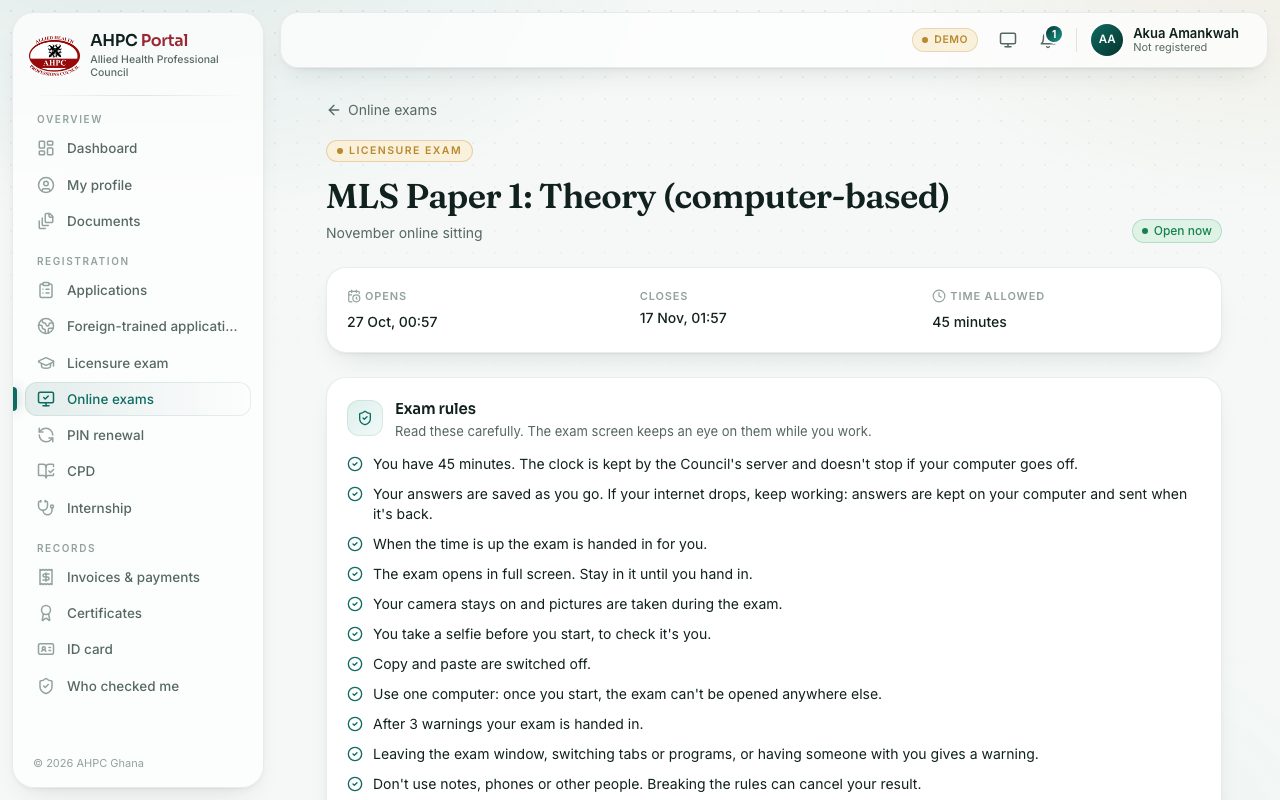
- On Online exams, press Start (or Read the rules before it opens) on the exam’s card.
- Check when it opens and closes and the Time allowed (any extra time you were given is included).
- Read the Exam rules carefully. The exam screen keeps an eye on them while you work.
- Tick I have read the rules. I will work alone and won’t use notes, phones or other help.
- At an exam centre: type the Exam centre code the invigilator shows.
- If the exam asks you to Show it’s you, take a quick picture so the portal can compare it with your passport photo.
- Press Start the exam. The exam opens in full screen and the clock starts straight away. Allow the camera when your browser asks.
What you will see
- Use a computer for this exam if you are on a phone and the exam needs a computer.
- This exam must be taken in Safe Exam Browser with a Download it button, if the exam needs it. The invigilator can help you.
Check yourself
Pick an answer for each question, then press Check my answers. Nothing is saved or sent.