
Schedule a sitting
A sitting is one time window when candidates take a published exam, from home or at a venue with an access code.
What you will learn
- Schedule a sitting
- Choose from home or at a venue
- Use and change the access code
demo.ahpcghana.com/staff/online-exams?tab=sittings
Step by step
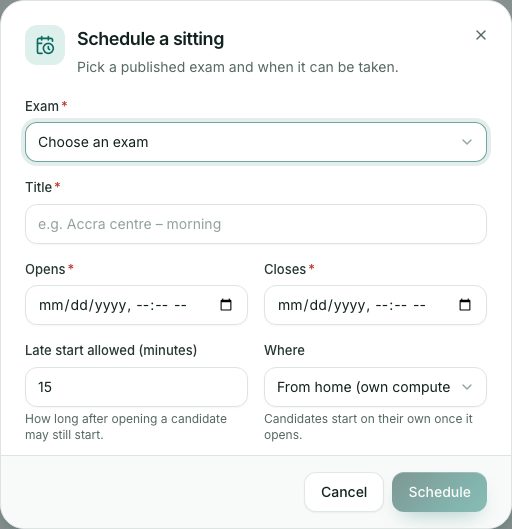
- On the Sittings tab press New sitting (or press Schedule a sitting on a published exam).
- Choose the Exam and type a Title, for example Accra centre – morning.
- Set Opens and Closes. Candidates can start any time in this window; each one gets the full time allowed, but never past the closing time.
- Set Late start allowed (minutes): how long after opening a candidate may still start.
- Choose Where:
- From home (own computer): candidates start on their own once it opens.
- At a venue (access code needed): candidates type the code the invigilator reads out.
- Press Schedule. The sitting page opens.
What you will see
- At the top of the sitting: when it opens and closes, where, how many candidates are writing or have submitted, and the Access code in large letters.
- Sitting statuses: Scheduled, Open now, Closed and Results out.
Check yourself
Pick an answer for each question, then press Check my answers. Nothing is saved or sent.