
Letters for your action
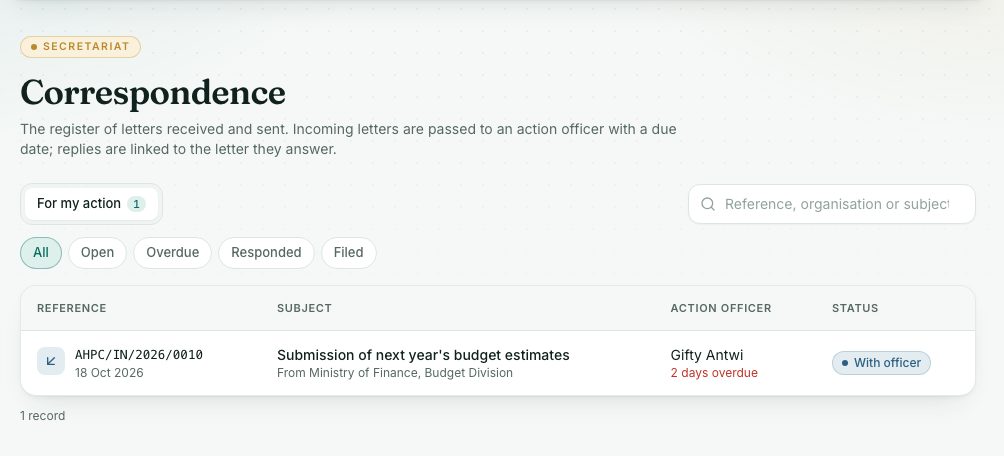
When the Secretariat passes you an incoming letter, you see it here with its reply date. Add notes and mark it responded.
What you will learn
- Find the letters waiting for your action
- Read the letter and its scanned copy
- Add a note and mark the letter responded
The Secretariat registers every letter the Council receives. When a letter needs action, they pass it to an action officer with a date the reply is due. If that is you, it shows here.
demo.ahpcghana.com/staff/secretariat/correspondence?tab=mine&my=1
Step by step
- In the left menu, open My work and press Letters for my action. The For my action tab shows your letters.
- Use Open, Overdue, Responded or Filed to filter.
- Press a letter to open it.
- Read who it is from, the dates, the Summary and the Scanned copy and enclosures.
- Add a note or a file to record what you are doing.
- When you have dealt with it, press Mark responded and add a note if you like.
What you will see
- The reply is overdue: the reply date has passed. Deal with it or tell the Secretariat.
- Statuses: Received, With officer, Responded, Filed.
- No letters are waiting for your action.: nothing to do.
Check yourself
Pick an answer for each question, then press Check my answers. Nothing is saved or sent.