
Get IT help
Report a computer, printer, network, email or portal problem to IT, follow your ticket and confirm when it is fixed.
What you will learn
- Report a problem to IT
- Follow your ticket and its response time
- Confirm the fix, or say it is still not working
demo.ahpcghana.com/staff/secretariat/it?my=1
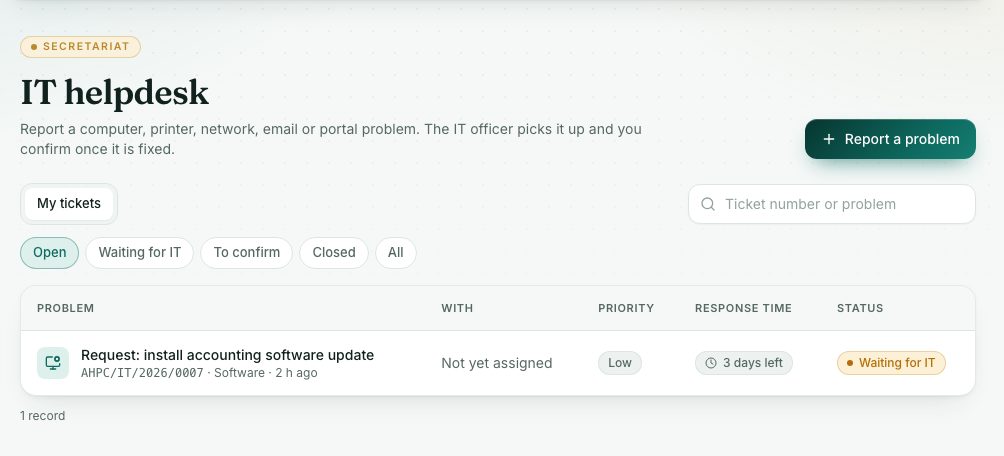
demo.ahpcghana.com/staff/secretariat/it?my=1
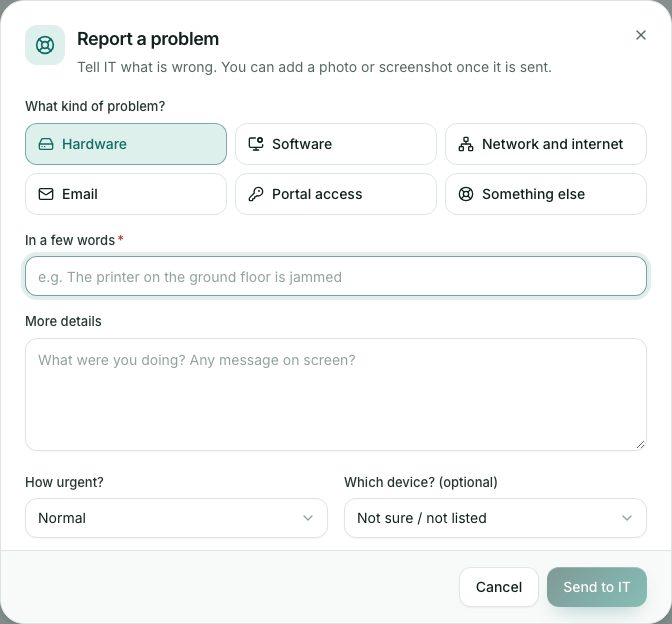
Step by step
- In the left menu, open My work and press IT help. The page is called IT helpdesk.
- Press Report a problem.
- Under What kind of problem? choose Hardware, Software, Network and internet, Email, Portal access or Something else.
- Fill in In a few words (for example The printer on the ground floor is jammed) and More details.
- Choose How urgent?. Use Urgent only when work has stopped.
- Pick the device in Which device? (optional) if it is listed.
- Press Send to IT. Your ticket gets a number. Open it to add a photo or screenshot.
- Follow it on the My tickets tab. Response time shows how long IT has left.
- When IT marks it fixed, open the ticket. If it works, press Yes, it is fixed. If not, press Still not working.
What you will see
- Statuses: Waiting for IT, Assigned, Being worked on, Resolved, Closed.
- IT says this is fixed: check that it works, then confirm.
- Response times by priority: Urgent 4 hours, High 8 hours, Normal 24 hours, Low 72 hours.
Check yourself
Pick an answer for each question, then press Check my answers. Nothing is saved or sent.