
Enter a candidate’s results
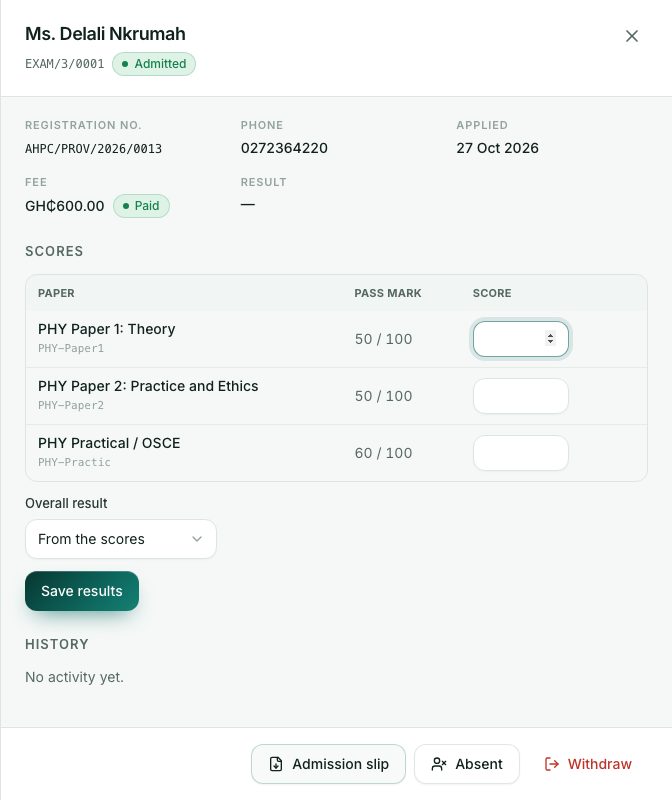
Type each candidate’s score for every paper. The portal works out pass or fail from the pass marks.
What you will learn
- Type scores for each paper
- Know how the overall result is worked out
- Override a result with a reason
- Mark a candidate absent
demo.ahpcghana.com/staff/exams?status=open
Step by step
- Open the session and click an admitted candidate.
- In Scores, type the score for each paper. The pass mark and the highest score are shown next to it.
- Leave Overall result on From the scores.
- Press Save results. The candidate’s status becomes Sat.
- If a candidate didn’t come, press Absent, then Mark absent, instead.
How the result is worked out
A candidate passes when every paper reaches its pass mark. Their score is the average of the papers. The result stays pending until every paper has a score.
Overriding a result
For example after a remark: choose Override: pass or Override: not passed in Overall result, type the Reason for the override and press Save results. The result then shows (overridden).
What you will see
- Pass or Fail next to each paper once you save.
- The Result column in the candidate list, for example Pass · 68.
Check yourself
Pick an answer for each question, then press Check my answers. Nothing is saved or sent.