
Keep the Registrar's schedule
See the Registrar's week or month, decide appointment requests, add travel or blocked time and print the agenda.
What you will learn
- Read the Registrar's calendar
- Accept, decline or move an appointment request
- Add travel, an event or blocked time
- Print the day or week agenda
demo.ahpcghana.com/staff/secretariat/registrar-schedule
Step by step
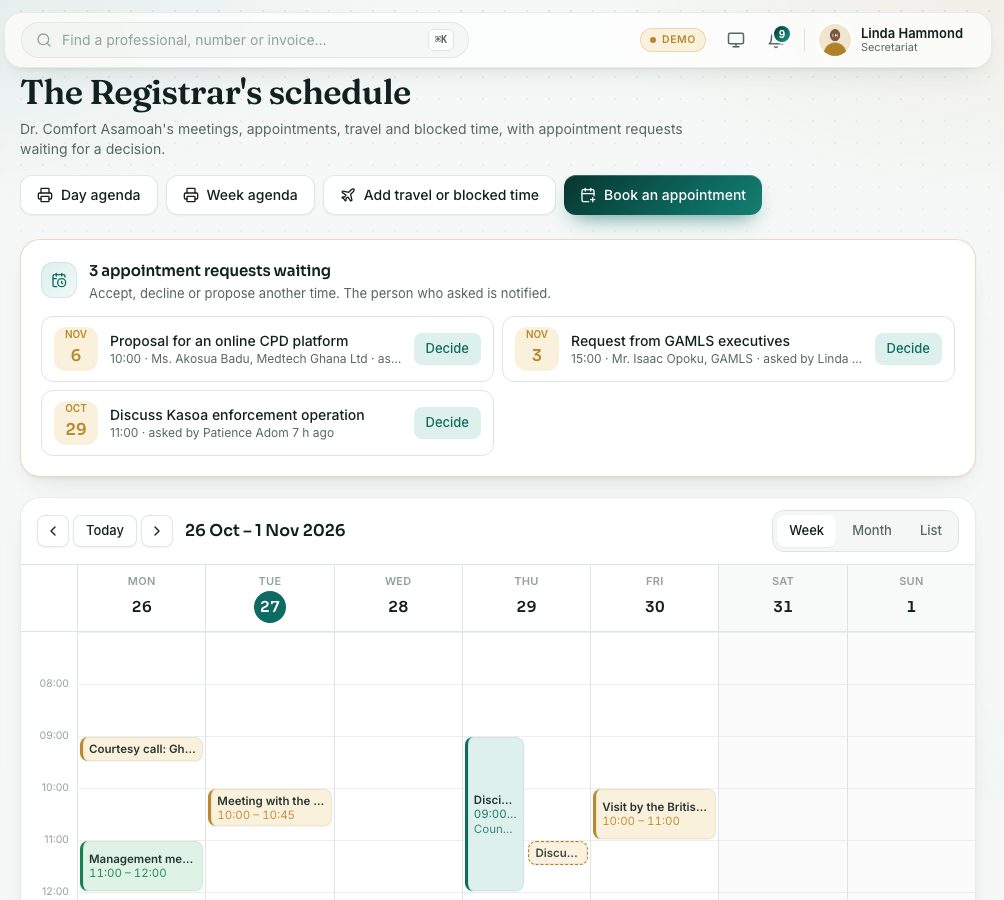
- In the left menu, open Secretariat and press Registrar's schedules. The page is called The Registrar's schedule.
- Switch between Week, Month and List. Use the arrows and Today to move.
- Requests waiting are listed at the top, in the … appointment request(s) waiting card. Press Decide.
- Choose Accept, Propose another time (pick the New date and time and Length) or Decline.
- The form tells you whether the Registrar is free. Add a note or reason: it is sent to the person who asked.
- To book an appointment yourself, press Book an appointment, or press a free slot on the week view.
- To block the Registrar's time, press Add travel or blocked time.
- Choose the Kind: Blocked time, Travel, Outside event, Leave or Other.
- Fill in Title (for example Tamale stakeholder forum), the dates or All day, Where and Notes, and press Save.
- Press Day agenda or Week agenda to print the agenda for the Registrar. The PDF carries a light watermark with your name and the date.
What you will see
- Colours: Council and committees, Appointments and visitors, Internal meetings, Travel, Outside events, Blocked time and leave.
- A dashed outline: Waiting for a decision.
- Nothing booked: the Registrar has nothing on the schedule for these days.
Check yourself
Pick an answer for each question, then press Check my answers. Nothing is saved or sent.