
Fraud alerts
Every day the portal looks for signs of fraud: the same person twice, shared phones and emails, reused certificates, odd payments and odd records. Look at each alert and confirm or dismiss it.
What you will learn
- Open Fraud alerts and read the counts
- Filter alerts by kind, importance and status
- Open an alert and look at the people and records
- Confirm or dismiss an alert with a note
An alert is a reason to look, not proof. Most have an innocent explanation (a shared family phone, a payment recorded twice). Your job is to check the records and write down what you found.
Step by step
- Open Compliance and Enforcement → Fraud alerts.
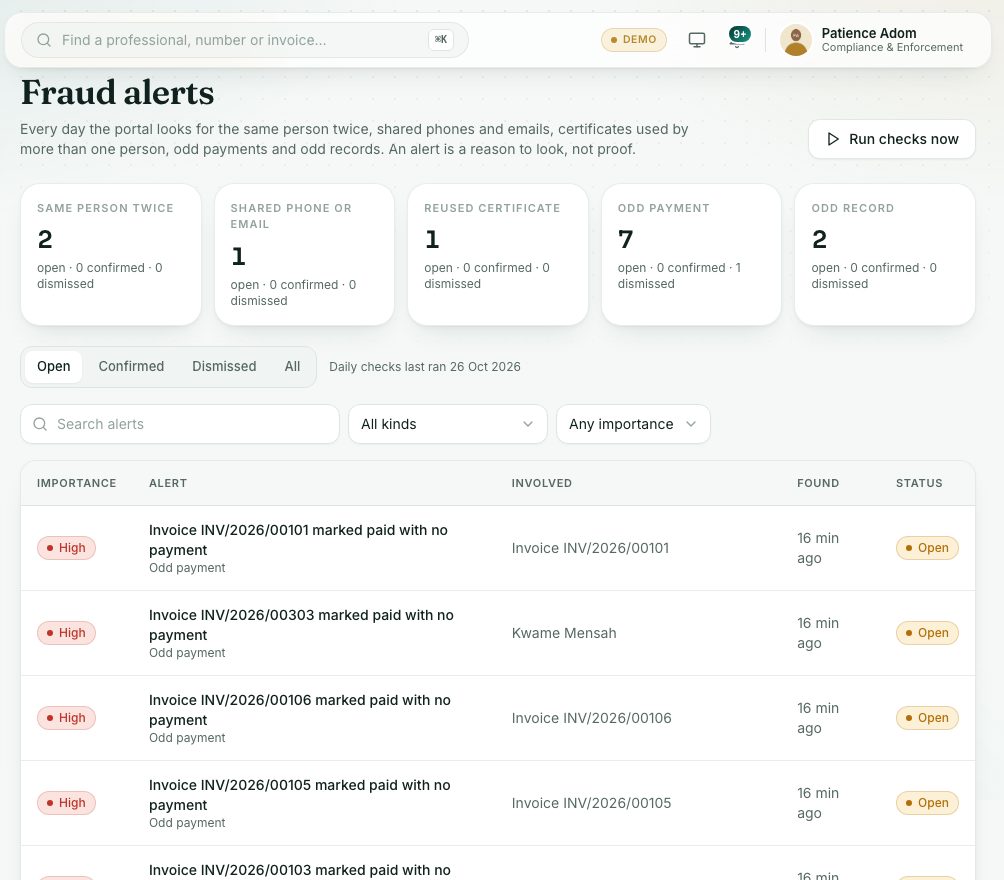
- Read the cards at the top. Each shows the open alerts of one kind, and how many were confirmed or dismissed. Click a card to show only that kind:
- Same person twice: two records that look like one person (the same Ghana Card or passport, the same name and date of birth, or the same passport photo).
- Shared phone or email: one phone number or email on several accounts.
- Reused certificate: the same file, certificate number or WAEC index number used by different people.
- Odd payment: for example an invoice marked paid with no payment behind it.
- Odd record: details that don’t add up, such as an age at application or a WAEC sitting that is too young.
- Use the tabs Open, Confirmed, Dismissed and All, the search box, All kinds and Any importance (High, Medium, Low).
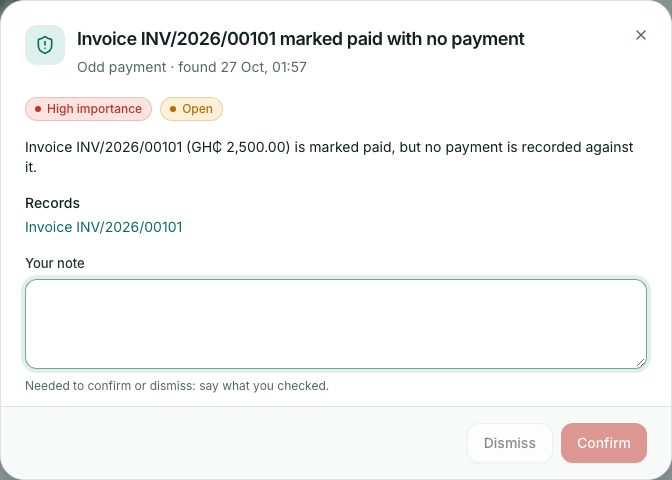
- Click an alert. Read the explanation, then open each person and record listed under People and Records.
- Type Your note: say what you checked and what you found. A note is required.
- Press Confirm if it is a real problem, or Dismiss if it isn’t. Press Reopen to look at a decided alert again.
Automatic document checks
The portal also checks uploaded documents (certificates, WAEC result slips, passport photos) for signs of tampering or reuse. Units that verify documents see a small badge on each one: Checked, Needs a look or Couldn’t check. The full list is under System administration → Automatic document checks, covered in the system administration course.
What you will see
- The line Daily checks last ran … says when the portal last looked.
- A decided alert shows who decided it and their note. An alert raised again after being dismissed says Looked at before and how many times it was raised.
Check yourself
Pick an answer for each question, then press Check my answers. Nothing is saved or sent.