
See what was collected (Accounting Statistics)
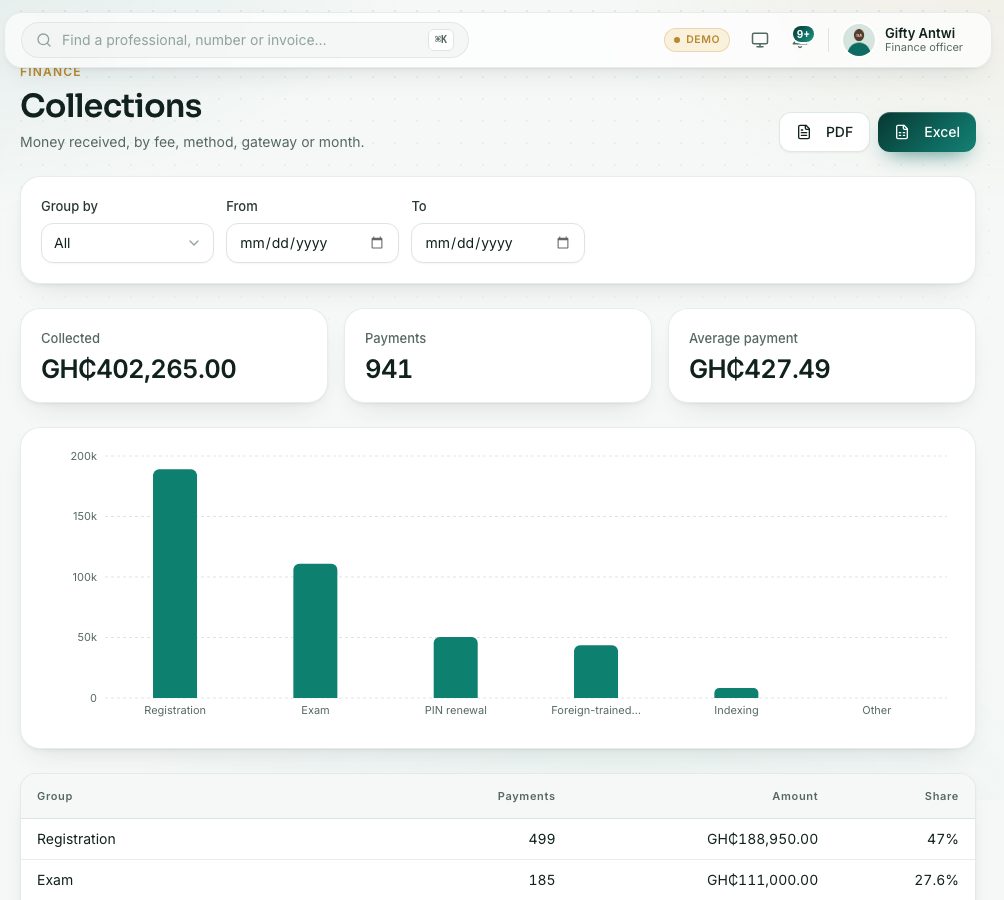
Accounting Statistics opens the Collections report: money received, grouped by fee, payment method, where it came from, or month.
What you will learn
- Open Accounting Statistics
- Group the money received in different ways
- Set a date range and download the figures
demo.ahpcghana.com/staff/reports/collections
Step by step
- In the left menu, open Accounts → Other payments → Accounting Statistics. The report is called Collections.
- Choose Group by: Fee, Payment method, Gateway (online through Hubtel or recorded by staff) or Month.
- Set From and To for the period you want, for example the last quarter.
- Read the totals at the top: Collected, Payments and Average payment.
- Each row shows the group, the number of payments, the amount and its Share of the total. Click a column heading to sort by it.
- Download with PDF or Excel. The file uses the filters you set.
Check yourself
Pick an answer for each question, then press Check my answers. Nothing is saved or sent.