
Policies and guidelines
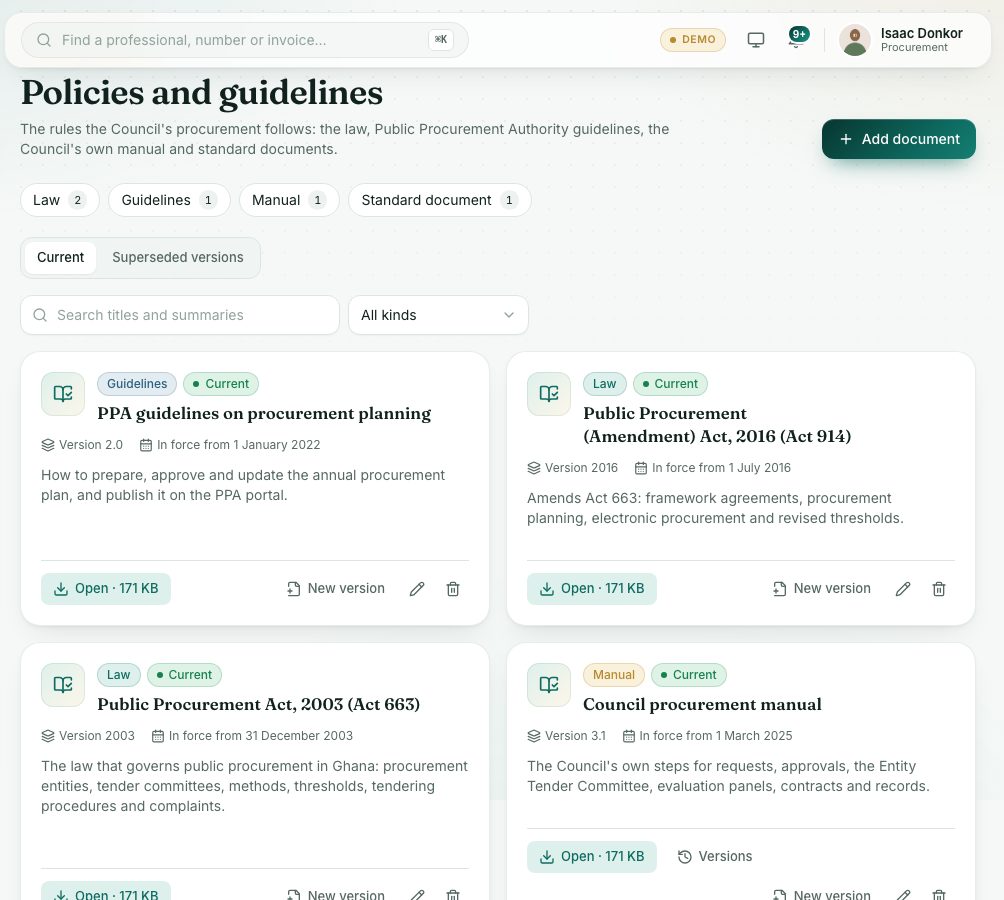
Keep the rules the Council's procurement follows in one place: the law, Public Procurement Authority guidelines, the Council's own manual and standard documents, with every version.
What you will learn
- Find a policy or guideline
- Add a document
- Add a new version and see older ones
demo.ahpcghana.com/staff/procurement/policies
Step by step
- In the left menu, open Procurement → Policies and guidelines.
- Press a kind at the top (for example Law, Guidelines or Manual) or use Search titles and summaries.
- Press Open on a card to read the file.
- To add one, press Add document: Title, Kind, Version (for example 2.0), In force from, a Summary and the file (PDF, Word or Excel, up to 10 MB). Press Save.
- When a document is updated, press New version on its card. The old one is kept as superseded.
- Press Versions on a card, or the Superseded versions tab, to see older versions.
Check yourself
Pick an answer for each question, then press Check my answers. Nothing is saved or sent.