
Coordinators: check and approve a student
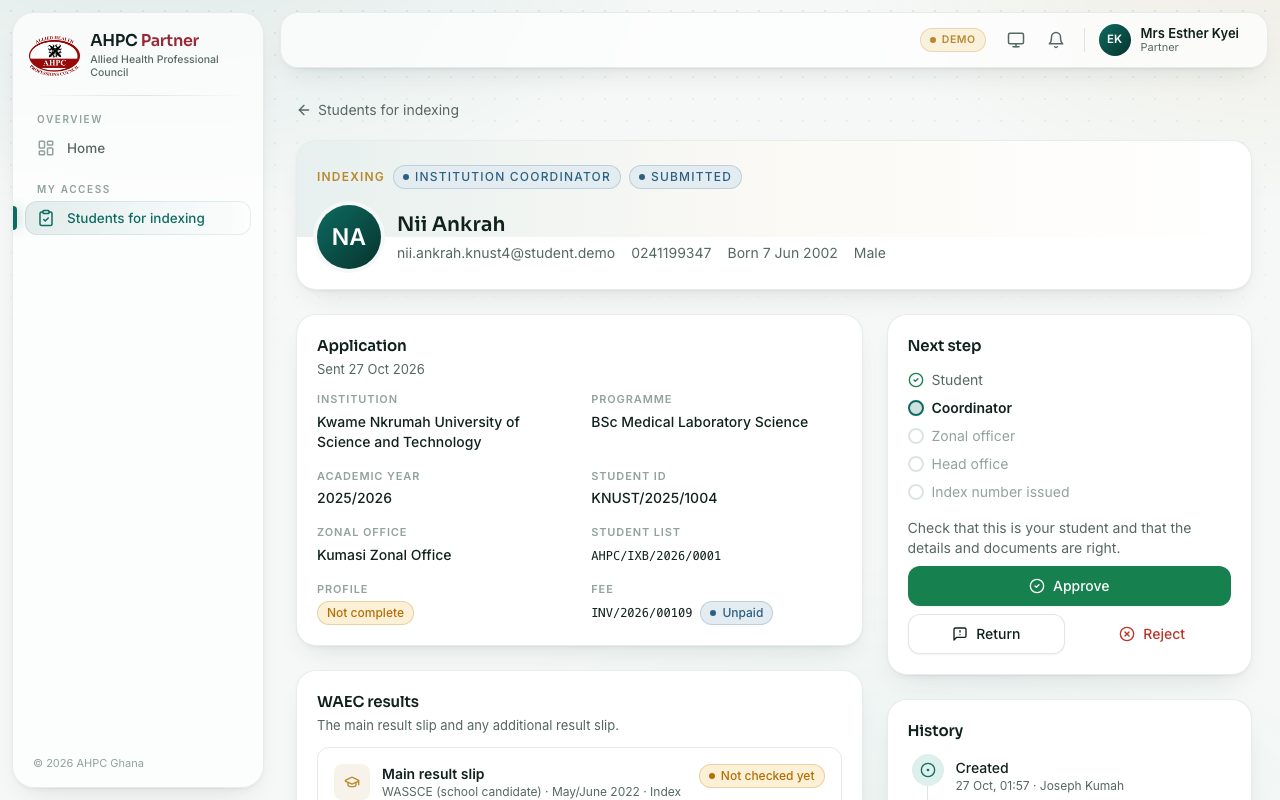
Check that the student is yours and that their details and documents are right, then approve, return or reject.
What you will learn
- Open a student’s application
- Approve it for the zonal office
- Return it to the student to fix
- Reject it
demo.ahpcghana.com/partner/indexing
Step by step
- Open My access → Students for indexing and press a student under To check.
- Check the Application: institution, programme, academic year and student ID. Check it is your student.
- Open the WAEC result slips and the documents and check they are right.
- Then, in the Next step box:
- Press Approve, add a comment if you like, and confirm. It goes to the zonal office.
- Or press Return and say what the student must add or fix. They are told by email and SMS, and it comes back to you when they send it again.
- Or press Reject and give the reason. This ends the application, and the student sees your reason.
What you will see
- After you approve, the student moves to With the zonal office. The Next step box says You approved this student.
- Your comment shows to the zonal officer and the Council as Institution coordinator’s note.
Check yourself
Pick an answer for each question, then press Check my answers. Nothing is saved or sent.