
Vehicles, fuel and servicing
Keep the Council’s vehicles on the register with their insurance and roadworthy dates, and record fuel and servicing so running costs add up.
What you will learn
- Add a vehicle and its papers
- Spot vehicles that need attention
- Record fuel and servicing
demo.ahpcghana.com/staff/general-admin/transport?tab=vehicles
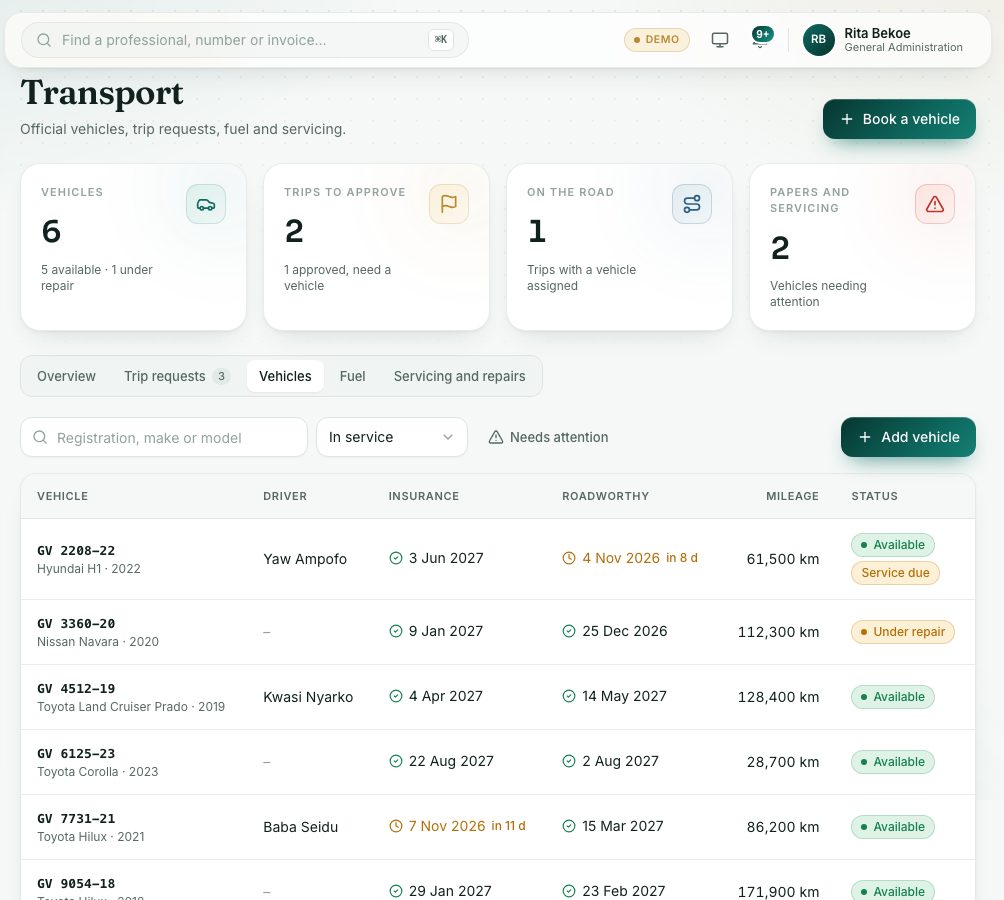
Step by step
- Open General Administration → Transport and press the Vehicles tab.
- Press Needs attention to see only vehicles with papers or servicing due.
- To add a vehicle, press Add vehicle:
- Type the Registration number, Make and Model (all needed).
- Add the Usual driver, Based at, Insurer, Insurance expires and Roadworthy expires.
- Press Save.
- Click a vehicle to see its servicing, fuel and recent trips. Press Edit vehicle to change it.
- On the Fuel tab, press Record fuel. Choose the Vehicle, type the Litres and Amount (GH₵), and press Save.
- On the Servicing and repairs tab, press Record servicing. Choose the Vehicle, the Kind of work, type the Work done and Cost (GH₵), add the Next service date if known, and press Save.
What you will see
- Dates in red have passed. Dates in amber run out within 30 days.
- The Overview tab shows running costs per month for the last six months.
Check yourself
Pick an answer for each question, then press Check my answers. Nothing is saved or sent.