
Repairs, offices and utility bills
Staff report repairs; you assign them and mark them done. Keep the list of offices and buildings, and track utility bills.
What you will learn
- Assign a repair and mark it done
- Add an office or building
- Add a utility bill and mark it paid
demo.ahpcghana.com/staff/general-admin/estate?tab=requests
Step by step
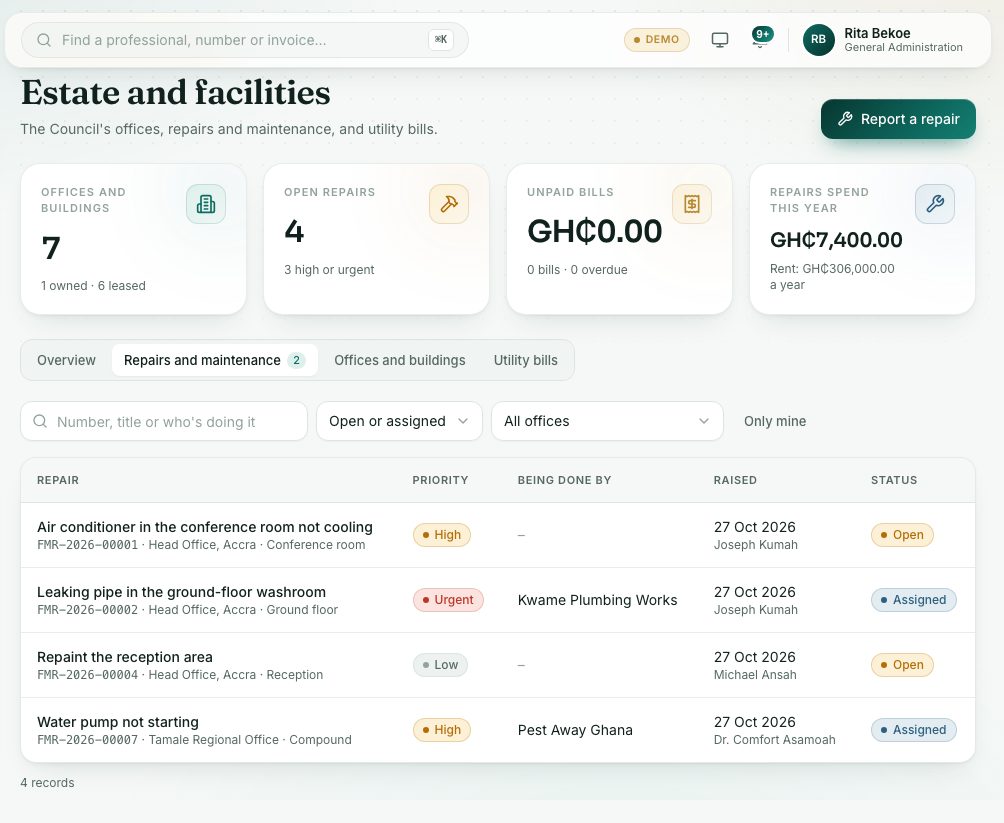
- Open General Administration → Estate. The page is called Estate and facilities.
- Open the Repairs and maintenance tab. Filter by status or office, or search by number, title or who is doing it.
- Click a repair to see where it is, what kind of work it is and who raised it.
- Press Assign. Type Who is doing it (a member of staff or a contractor), set How urgent and press Assign.
- When the work is finished, press Mark as done. Add the Cost (GH₵) and What was done, and press Mark as done in the box.
- On the Offices and buildings tab you keep each office, whether it is owned or leased, the landlord, rent a year and lease dates.
- On the Utility bills tab, add a bill with the office, utility, period and Amount (GH₵). Press Mark paid when it is paid.
- To report a repair yourself, press Report a repair at the top, choose the Office, type What needs fixing and press Send.
What you will see
- Repair statuses: Open, Assigned, Done and Cancelled. Priority shows Low, Normal, High or Urgent.
- Bills show Paid with the date, Not paid or Overdue.
- The Overview tab lists leases ending within the next 90 days.
Check yourself
Pick an answer for each question, then press Check my answers. Nothing is saved or sent.