
Keep the asset register
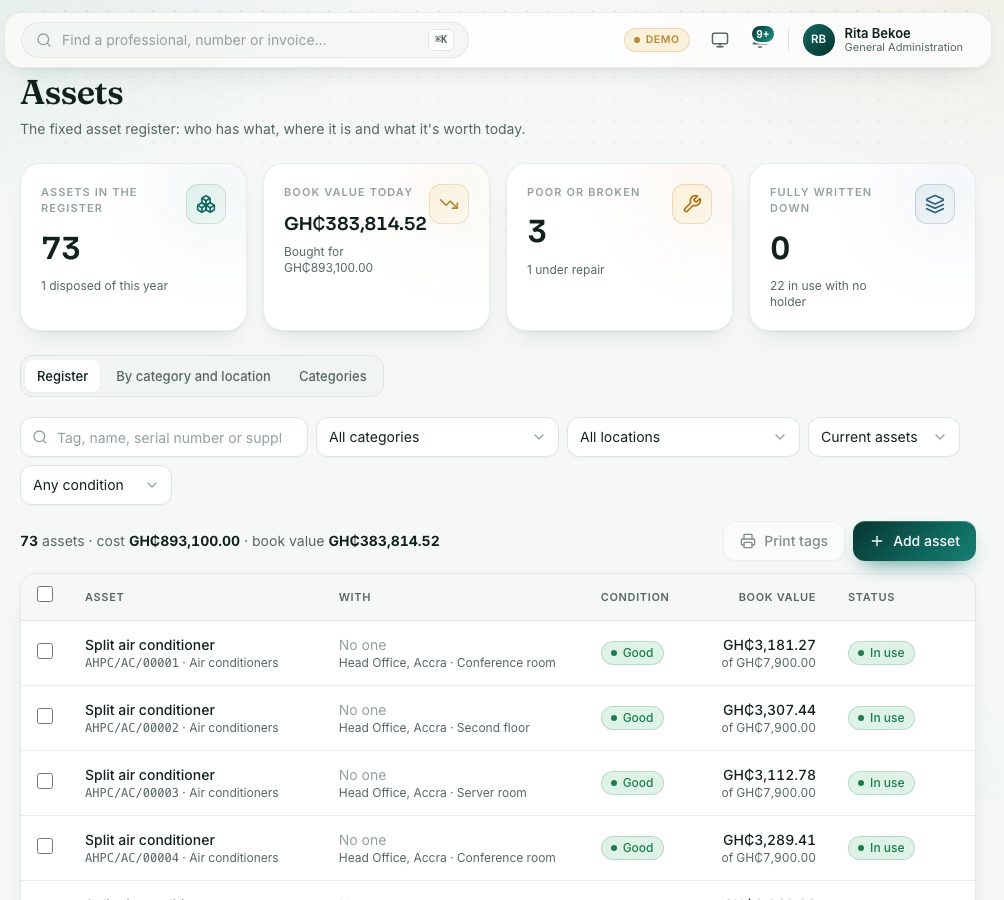
The fixed asset register shows who has what, where it is and what it is worth today. Add assets, move them, print tags and record disposals.
What you will learn
- Add an asset
- Move or reassign an asset so the history is kept
- Print asset tags
- Record a disposal
demo.ahpcghana.com/staff/general-admin/assets
Step by step
- Open General Administration → Assets. The Register tab lists every asset.
- Search by tag, name, serial number or supplier, or filter by category, location, status and condition.
- To add an asset, press Add asset:
- Type the Name, choose the Category, and enter Bought on and Cost (GH₵).
- Add the Location and who it is Given to.
- Press Save. The tag number is given when you save.
- Click an asset to see its book value over its life and its history.
- To change who has it or where it is, press Move or reassign, choose Give to and the Location, and press Record the move.
- To print tags, tick the assets in the list and press Print tags. Say how many labels are already used on the first sheet, then press Open labels.
- When an asset is sold, scrapped or lost, open it, press Dispose of, choose How and press Record disposal.
- On the Categories tab you set each category’s tag code, useful life and residual value.
What you will see
- Status: In use, In store, Under repair or Disposed. Condition: New, Good, Fair, Poor or Broken.
- Book value is the cost less wear over the category’s useful life.
- Tag numbers look like AHPC/ICT/…, using the category’s tag code.
Check yourself
Pick an answer for each question, then press Check my answers. Nothing is saved or sent.